



Yes, you can automate Airbnb review posting, and it works well when you build it around templates, reliable reservation triggers, and a manual-exception queue for anything sensitive. Do not let a system auto-publish blind. Test it first, keep a human checkpoint for negative or personal-data cases, and treat automation as a support tool, not a replacement for judgment.
TL;DR:
- Automated review posting works best when triggered by reservation events, with manual oversight for sensitive or negative cases.
- Proper setup includes selecting low-risk properties first, building tailored templates, and running thorough tests before enabling auto-publish.
- Using software with direct Airbnb integration, proper listing mapping, and detailed audit logs reduces errors and ensures compliance.
- Review timing rules require respecting the 14-day window for both parties to submit reviews, and automated content must avoid personal data or discriminatory language.
- Consistent guest experience at check-in and early, personalized follow-up significantly increases the likelihood of positive reviews and better booking rates.
Table of Contents
- How Airbnb Review Automation Actually Works
- How to Set Up Automated Guest Feedback Step by Step
- Choosing the Right Software Category for Review Automation
- What Are Airbnb’s Review Timing and Privacy Rules?
- Common Setup Mistakes and How to Catch Them Early
- Does Review Automation Actually Affect Your Booking Rate?
- Getting Guests to Leave Better Reviews Without Asking Twice
- Keeping Automated Reviews Authentic and Policy-Safe
- Quick Recap for Hosts Ready to Automate
- A Smoother Path to More Reviews Starts at Check-In
- Sources
- FAQ
How Airbnb Review Automation Actually Works
Airbnb review automation runs on reservation events, not calendar dates. Once a guest checks out, the system waits for the checkout timestamp to register, then queues a review for drafting or publishing. Most platforms publish at midnight in a set time zone, matching Airbnb’s own release schedule once both parties have submitted a review or the window closes.
Templates and short codes make the process feel personal instead of robotic. A short code pulls in the guest’s first name, the property nickname, or the length of stay, so no two reviews read identically even when they share a structure. Randomization goes a step further, rotating between several pre-approved phrasings so the same host voice doesn’t repeat word-for-word across dozens of reviews, which Airbnb’s own systems and guests alike can flag as suspicious.
What varies by platform is how much control you get before anything goes live:
- Draft creation after checkout, held for review
- Scheduled publishing at a set delay
- Edit-before-publish windows that let you tweak wording
- Auto-publish with no human touch (riskiest, and not recommended without a track record)
Guest review automation tools that only offer the last option deserve extra scrutiny before you rely on them.
How to Set Up Automated Guest Feedback Step by Step
Setting up automated guest feedback isn’t a one-click toggle. Treat it like onboarding a new employee: give it clear rules, watch it closely at first, then loosen the leash.
- Pick which properties to automate first. Start with your highest-volume, lowest-drama listing. A unit with a long history of five-star stays gives you a clean testing ground before you touch anything trickier.
- Build template groups by stay type. Separate templates for short stays, long stays, and repeat guests keep the language relevant instead of generic.
- Add short codes for personalization. Pull in guest name, stay length, and property name automatically so each review reads as written for that specific trip.
- Set timing rules. Decide how many hours or days after checkout the draft generates, and whether it auto-publishes or waits for your approval.
- Build an exception queue. Any stay flagged with a complaint, incident report, or support ticket should route to manual review, never straight to auto-publish.
- Confirm the Airbnb connection and listing mapping. Check that each property in your software matches the correct Airbnb listing ID. Mapping errors are the single most common cause of a review landing on the wrong unit.
- Check your audit logs. Confirm the system records who approved what and when. This matters for internal accountability and for any GDPR-related data request.
- Review the data-processing terms. Confirm the vendor’s hosting and data handling meet EU requirements if you operate in Spain or elsewhere in the EU, per the vacation rental software guidance on data-processing terms.
- Run four test scenarios before going live: a standard completed stay, a cancellation, a date change, and a multi-unit booking. Each one exposes a different failure mode, from mapping errors to trigger timing.
Only after all four tests pass cleanly should you flip auto-publish on, and even then, start with your safest template group.
Choosing the Right Software Category for Review Automation
Not all Airbnb response software lives in the same kind of tool, and picking the wrong category is where most hosts get stuck. Property management systems (PMS) with built-in review rules tend to offer the deepest reservation integration, since they already own the booking data end to end. Channel managers with review modules bolt review automation onto their core job of syncing calendars and rates, which works fine but sometimes lags on edge cases like same-day cancellations. Messaging automation platforms focus on guest communication first, with review triggers as a secondary feature, so they’re often lighter on template controls.
Before subscribing to any review management system, verify these basics:
- Direct Airbnb connectivity, not a workaround through a generic API
- Accurate listing mapping across every property you manage
- Audit logs showing who approved or edited each review
- Randomization and approval controls, not just a single fixed template
- Multi-channel sync so a review trigger on one platform doesn’t fire twice elsewhere
A system tied directly to reservation events beats an ad-hoc tool triggered by a spreadsheet or manual reminder, because reservation-linked triggers update automatically when a stay changes. Reliability here is less about brand and more about whether the vacation rental software you choose ties triggers to real reservation data rather than a static calendar entry.
What Are Airbnb’s Review Timing and Privacy Rules?
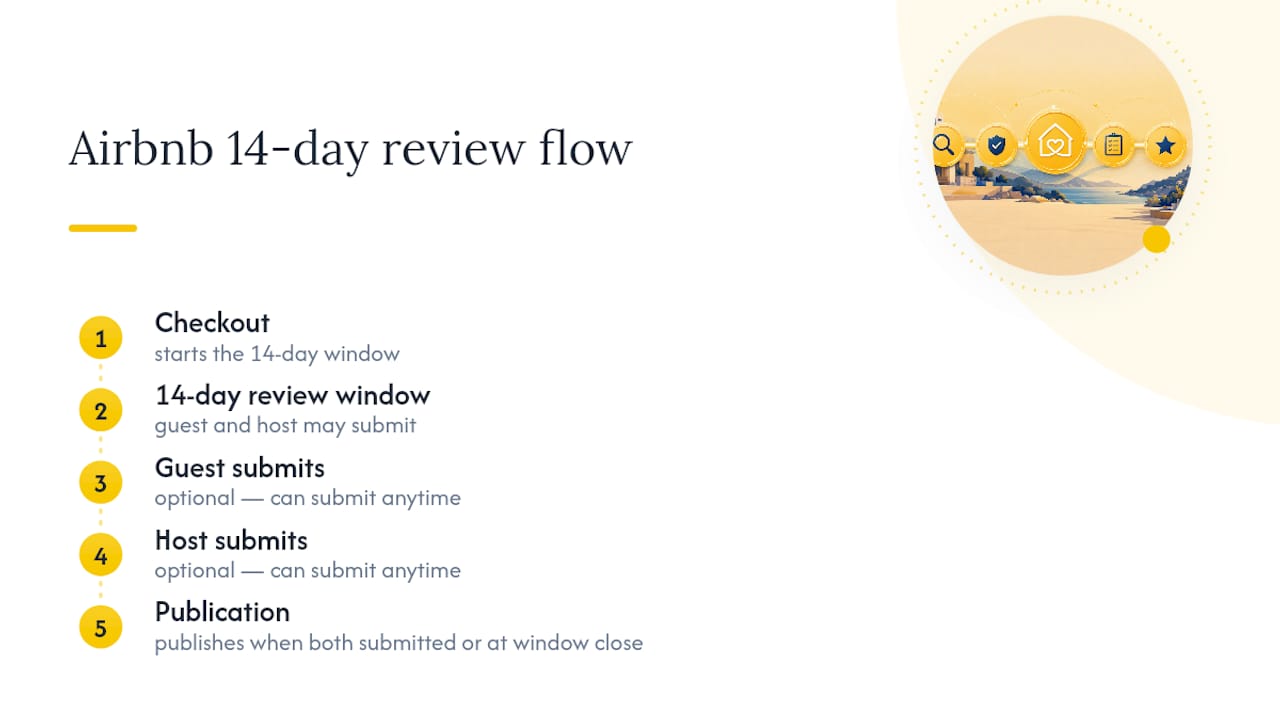
Airbnb gives both guests and hosts a 14-day window after checkout to write a review, and reviews only go live once both sides have submitted theirs or the window closes, whichever comes first, according to Airbnb’s own review timing guidance. Any automation you build has to respect that window. A system that tries to publish before the 14-day period closes, or that ignores the mutual-submission rule, will simply fail silently or get rejected by Airbnb’s systems.
Content rules matter just as much as timing. Airbnb’s Reviews Policy prohibits discriminatory language, defamatory claims, and the disclosure of private personal data in public reviews or responses. You can respond publicly to a guest review, but that response has to stay factual and avoid naming specifics that identify a third party or reveal sensitive information.
This is where GDPR risk creeps in. Automated moderation, even good moderation, can miss personal data buried in a review or a response draft.
Automated content screening is not foolproof. Regulatory guidance from the European Data Protection Board makes clear that platforms and hosts need a manual fallback and a deletion or access process for any content that may contain personal data slipping past automated checks.
The practical fix is straightforward: redact personal identifiers before anything publishes, and keep incident details in a private log instead of a public reply. If a guest damages a unit or violates house rules, note it internally. Never put it in the review response, per the EDPB’s findings on moderation and personal data.
Common Setup Mistakes and How to Catch Them Early
Most review automation failures trace back to two things: trigger errors and mapping mismatches. A duplicate listing, a checkout time that changed after a guest extended their stay, or a property merged under a new ID can all cause a review to fire late, fire twice, or land on the wrong unit entirely. These aren’t rare edge cases. They’re the most commonly cited failure points across vacation rental software implementations.

Build a maintenance routine instead of a one-time setup. Every week, audit pending drafts sitting in your approval queue. Every month, rerun your edge-case tests, cancellation, date change, multi-unit booking, to catch anything that broke silently after a software update. Log every incident that touches GDPR concerns or a guest dispute, separate from your public review history.
Pro Tip: Keep your public review replies short, factual, and boring on purpose. Save the color commentary for your internal notes. A flat, professional tone in public protects you legally and reads better to future guests than an emotional response ever will.
Does Review Automation Actually Affect Your Booking Rate?
Consistency, not volume, is what moves the needle on booking rates. A guest scanning listings cares less about how a review got posted and more about whether the feedback pattern looks trustworthy across dozens of stays. Automated systems that generate varied, timely reviews tend to produce a steadier flow of feedback than hosts who write each response manually and fall behind during busy weeks.
Falling behind is the real reputation risk. A host who only responds to five of the last twenty reviews looks less engaged than one who responds to all twenty, even if the manual responder wrote more thoughtful replies. Speed and consistency compound over time. Guests browsing a listing often skim the most recent handful of reviews and host responses before booking, so a gap in your response history sitting near the top of your review page does more damage than an average response buried on page three.
The flip side is real too. A host reputation built on obviously templated, repetitive language can backfire. If every review response reads identically, guests notice, and it reads as impersonal rather than efficient. That’s why randomization and short-code personalization aren’t just nice touches. They’re what keeps automated consistency from tipping into automated sameness. Booking rate improvements from automation come indirectly, through fewer missed responses and a more complete review history, not from any trick in the review text itself.
Getting Guests to Leave Better Reviews Without Asking Twice
The best strategy for encouraging positive automated guest feedback starts before checkout, not after. A smooth arrival, clear house instructions, and fast responses to in-stay questions do more to shape a guest’s final review than anything written in a post-stay message.
Timing your own review submission matters more than most hosts realize. Airbnb reviews only become visible once both sides submit or the 14-day window closes, so submitting your review promptly after checkout can prompt the guest to reciprocate sooner, especially with a thank-you message sent alongside it. A templated but warm checkout message, thanking the guest and mentioning something specific about their stay, tends to outperform a generic “please leave a review” nudge.
Avoid the temptation to over-incentivize. Offering discounts or perks explicitly tied to leaving a positive review violates Airbnb’s policies and can get flagged. Instead, focus your automation on removing friction: send checkout instructions early, follow up quickly if something went wrong during the stay, and make it easy for guests to reach you before they’d ever consider venting in a public review instead.
Guests who feel heard during a stay are far more likely to leave a genuine, positive review after it, automated or not. The automation just makes sure you never miss the window to ask.
Keeping Automated Reviews Authentic and Policy-Safe
Authenticity and automation aren’t opposites, but they require deliberate design. The goal is a system that produces reviews indistinguishable from ones you’d write by hand, at a pace no human could sustain alone.
Rotate through multiple approved template variations rather than relying on one master template with swapped names. Vary sentence structure, not just the guest’s name and dates. Keep your language specific to the actual property and stay type. A generic “great guest, would host again” message posted fifty times looks automated, even when a human wrote each one individually.
Compliance means respecting Airbnb’s Reviews Policy on every automated response: no personal data, no discriminatory language, no retaliatory tone toward guests who left critical feedback. If a guest’s review upset you, that is precisely when a manual-exception queue earns its place, routing emotionally charged situations to a human before any public response goes out.
Run periodic audits comparing your automated output against Airbnb’s guidelines, not just once at setup but quarterly, since policies and platform behavior shift. Treat your review management system the way you’d treat any compliance tool: useful when maintained, risky when left running unattended for months without a check.
Quick Recap for Hosts Ready to Automate
Automation earns its place in your workflow the moment it stops being a black box. Pick the right software category, build templates that sound like you, test the four core scenarios, and keep approval controls on until you trust the pattern. Everything else, the reputation gains, the time saved, the consistency, follows from getting that foundation right rather than from any single feature.
If you take one action this week, run the testing checklist: standard stay, cancellation, date change, multi-unit booking. That single exercise will tell you more about whether a system is ready for auto-publish than any spec sheet.
— Sofía Herrera
A Smoother Path to More Reviews Starts at Check-In
Review automation only works as well as the guest experience feeding it, and that experience starts long before checkout. Some software platforms aim to reduce reservation errors and smooth guest flows for hosts in Spain, without requiring an agency or spreadsheet workarounds.

A guest who checks in smoothly, finds a clear digital guide waiting for them, and never deals with a booking mix-up is a guest far more likely to leave a review worth automating in the first place, as detailed in the hotel check-in process workflow for hospitality managers. Eurocheckin’s check-in online for vacation rentals handles multilingual self check-in, syncs your calendar across Airbnb, Booking, and more than a dozen other platforms to prevent the overbookings that break review triggers entirely, and automates your SES Hospedajes reporting so legal compliance never becomes your bottleneck. Plans start at 5 EUR per month per accommodation, with a free trial. If you manage a hotel instead, EuroCheckin para hoteles runs 3 EUR per month per room. Start your free trial and see how much friction disappears from your guest flow before your next review cycle even begins.
Sources
- Capterra — Vacation rental software overview
- Airbnb: How long you have to write a review
- EDPB summary FD-517446 — moderation and personal data in reviews
FAQ
What percentage of Airbnb guests leave a review?
Airbnb has not published an exact public figure for review completion rates, and estimates circulating online vary too widely to cite reliably. What’s consistent is that prompt, personalized checkout messages tend to raise response rates compared to no follow-up at all.
Is Superhost status better than a Guest Favorite badge?
They measure different things. Superhost status reflects a host’s overall response rate, cancellation history, and review scores over time, while Guest Favorite highlights listings guests rate exceptionally well regardless of host tenure. Neither replaces the other, and many strong listings hold both.
Can a host see a guest’s review before writing their own?
No. Airbnb hides both reviews until either both parties submit theirs or the 14-day review window closes, whichever happens first. This blind system is designed to prevent retaliatory or influenced reviews on either side.
What is the 80/20 rule mentioned around Airbnb reviews?
This isn’t an official Airbnb policy. Treat it as a rough behavioral pattern, not a documented rule.
Does Eurocheckin help with review automation directly?
Eurocheckin doesn’t post reviews for you, but it improves the guest experience that drives them, through smooth check-in automation, reliable calendar sync, and fewer reservation errors that otherwise break review triggers on other platforms.


