


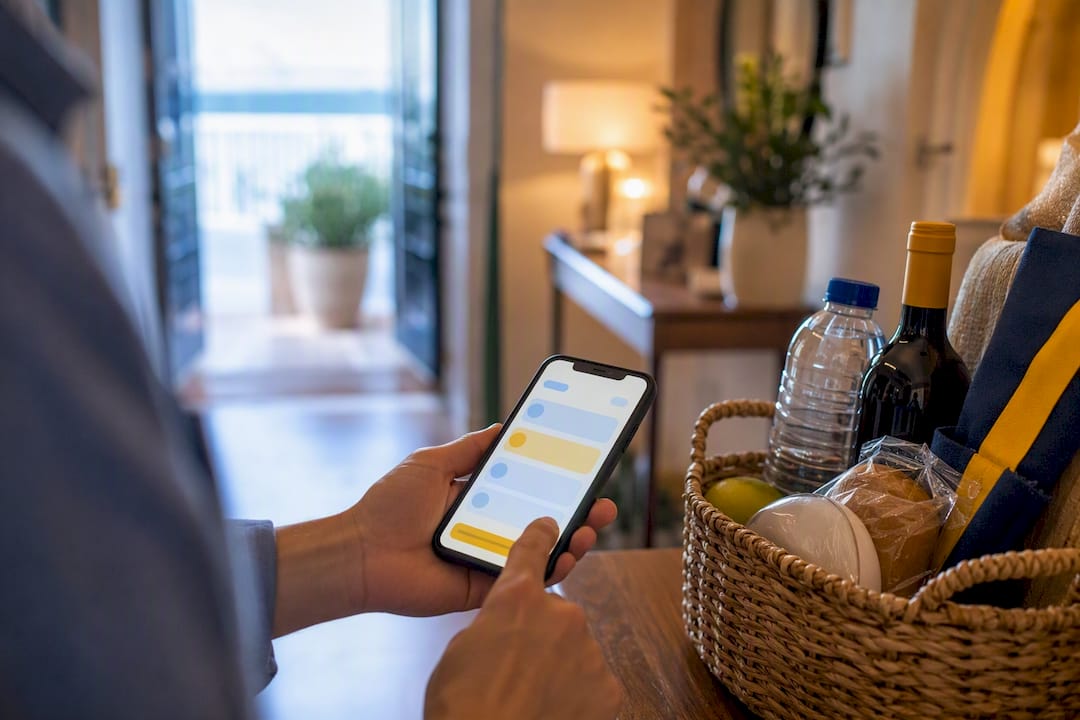
An extra services menu is the short, priced list of optional add-ons guests can buy before or during their stay, from early check-in to a stocked fridge on arrival. Start with early check-in or late checkout, a welcome basket, and a grocery pre-stock box. These three convert fastest because they need no outside vendor, and hosts who send pre-stay offers 48 to 72 hours before arrival report an extra revenue boost per stay when the payment link is a single tap.
TL;DR:
- Most revenue in the first three months comes from offering early check-in, welcome baskets, and grocery pre-stocks, with typical take rates between 15% and 30%.
- Pricing should be low enough to remove hesitation, with €20 to €35 for check-in flexibility and €45 to €85 for welcome baskets, ideally offered within recommended time windows.
- Automating offers through payment links and scheduling messages 48 to 72 hours before arrival or two days before checkout increases conversion and minimizes manual work.
- Partner-dependent add-ons like transfers require confirmed real-time availability and clear cancellation policies to avoid guest dissatisfaction.
- Limit the extra services menu to two or three targeted offers presented clearly with photos, timing, and prices, to maximize guest uptake and maintain consistency.
Table of Contents
- Which Add-Ons Should You Sell First?
- When Should You Offer Each Add-On, and What Should You Charge?
- How Do You Collect Payment and Automate Delivery?
- How Do You Set Up Partners for Services You Don’t Deliver Yourself?
- What Should You Track to Know If It’s Working?
- How Do You Handle Guest Pushback or Custom Requests?
- How Do You Keep Inventory and Availability Current?
- How Do You Train Staff or Partners to Deliver Consistently?
- What Legal and Tax Rules Apply to Paid Guest Extras?
- How Do You Promote Extras Without Annoying Guests?
- How Should You Design the Menu Itself?
- A Quick-Play Checklist for Busy Operators
- Sell Extra Services Without Leaving Your Check-In Flow
- Sources
- FAQ
Which Add-Ons Should You Sell First?
You don’t need twenty items on your extra services menu to see results. Five offers cover most of the revenue you’ll capture in the first three months, and each one tells you something about the effort it demands.
- Early check-in or late checkout. Guests will pay to avoid sitting in a café with luggage. Requires only a calendar buffer check before you confirm, and it’s the single easiest yes on any service enhancement menu.
- Welcome basket or essentials box. A fixed-contents box (wine, snacks, local products) removes the need to shop per guest. Fixed essentials boxes priced around €45 to €85 convert nearly as well as bespoke grocery runs but with far less effort on your end.
- Grocery pre-stock. Higher perceived value than the essentials box, but it needs a local shopper or partner and a cutoff time for orders.
- Airport or station transfer. Strong margin if you work with a fixed-rate driver; requires a reliable partner and a confirmation step.
- Mid-stay clean. Works best for stays over five nights; needs a cleaner with real-time availability, not just a name on a list.
Price the first two low enough to remove hesitation. €20 to €35 for check-in flexibility, €45 to €85 for the welcome box, is a starter range that multiple host guides confirm produces take rates generally reported between 15% and 30%, when the timing is right.
When Should You Offer Each Add-On, and What Should You Charge?
Timing decides whether a guest buys or ignores the offer entirely. A grocery box pitched the morning of arrival is too late. A late checkout pitched at booking is too early, because the guest doesn’t yet know if they’ll want it.
- At booking: mention that add-ons exist, but don’t hard-sell. This primes the guest without asking for a decision.
- 48 to 72 hours before arrival: this is the window for welcome baskets and grocery pre-stock. Guides for hosts consistently recommend this window because the guest is now planning logistics and wants the fridge stocked without a supermarket run.
- The morning after check-in: offer experiences, transfers, or a mid-stay clean. The guest has settled in and can picture using the service.
- Two days before checkout: this is when late checkout converts best, once the guest realizes they don’t want to rush their last morning.
Keep the extra services menu to two or three options per message. Choice overload measurably reduces conversion, so save the fourth and fifth item for a follow-up touchpoint rather than cramming everything into one message.
Pro Tip: Write the price into the message itself, never “available on request.” Guests convert at noticeably higher rates when they see an explicit price and a one-line benefit than when they have to ask.
Two templates you can copy directly:
Pre-arrival (sent 48 to 72 hours out): “Your stay starts in a few days. Want your fridge stocked before you arrive? Essentials box, €55, ready when you walk in. [Payment link]”
Pre-checkout (sent two days before departure): “Not ready to rush out on your last day? Late checkout until 2 PM, €30. Reply yes and we’ll lock it in. [Payment link]”
How Do You Collect Payment and Automate Delivery?
Selling the offer is only half the job.
- Payment links (Stripe or similar): guest taps, pays, done. No app download, no back-and-forth.
- Apple Pay and Google Pay: cut checkout to one tap on mobile, where most of these messages get opened and read.
- Cash or card on arrival: works, but it depends on someone being physically present, which defeats the purpose of a low-friction upsell.
Automation is what turns this from a manual chore into a repeatable system. A check-in tool that scans your calendar and sends the welcome basket offer automatically at the 60-hour mark, then the late checkout offer two days before departure, removes the need to remember anything. Integrating timed, automated pre-stay messages through a PMS or check-in tool has been shown to raise take rates compared to sending the same messages by hand.
Every paid extra also needs a paper trail. A receipt tied to the booking, not a loose note in your inbox, saves you at tax time and settles disputes fast. EuroCheckin lets you build and sell your own extra services directly inside the guest check-in flow, with guests paying through Apple Pay or Google Pay in seconds and a new service added in about two minutes, no IT team required.
How Do You Set Up Partners for Services You Don’t Deliver Yourself?
Transfers, experiences, and equipment rental usually mean working with someone else. Get the commercial terms and the operational safeguards straight before you list the item on your extra services menu, or a single missed pickup will cost you a five-star review.
Two common models: a referral fee, where a local partner pays you 10 to 20% of whatever the guest spends, or a wholesale plus markup, where you buy the service at a fixed rate and resell it at your own price. Both structures are standard in vacation rental upselling, and the simpler referral model is usually the faster one to launch.
Before you add any partner to your menu:
- Confirm their real-time availability, not a general “usually available.”
- Agree on a confirmation window (how fast they confirm a booking request).
- Write down cancellation terms in case the guest changes plans.
- Get a direct contact, not a generic booking inbox, for day-of issues.
Avoid listing anything a partner can’t confirm same-day. Unconfirmed availability and late confirmations are the two fastest ways an upsell turns into a guest complaint instead of a five-star mention.
What Should You Track to Know If It’s Working?
Five numbers tell you whether your extra services menu is earning its place: exposure rate (how many guests saw the offer), take rate (how many bought), revenue per booking, margin per item, and review uplift after fulfillment.
Run the math on just one item.
Add a new item to the menu only once the current ones run cleanly for a month: fulfillment shows up on time, margin stays positive, and guest feedback doesn’t flag it. Tag each add-on to its booking record and export the numbers monthly so you can see, at a glance, which items are earning their spot and which need a price adjustment.
How Do You Handle Guest Pushback or Custom Requests?
Some guests will ask for a discount, a bundle, or a version of the service you don’t offer. How you respond shapes whether they buy something else instead of walking away annoyed.
For price objections, hold the line on the posted price rather than negotiating case by case. A published price on your extra services menu that changes per guest erodes trust fast, especially once guests start comparing notes in reviews. Instead, offer a genuine alternative at a different price point: if the €85 grocery box feels steep, mention the €45 essentials version.
For customization requests, that is, a guest wanting a modified checkout time, a specific grocery brand, or a transfer at an odd hour, decide in advance what you can accommodate without extra cost and what requires a small surcharge. Write this into your standard reply so you’re not improvising every time. A simple rule like “checkout past 3 PM adds €15 to the standard late checkout fee” keeps the conversation fast and consistent.
Don’t treat every request as a one-off. If you’re fielding the same customization question repeatedly, that’s a signal to add it as a formal line item rather than handling it manually each time. Track these requests for a month and you’ll usually find one or two that deserve their own price and their own spot on the menu.
How Do You Keep Inventory and Availability Current?
Nothing damages a guest’s first impression faster than paying for a service that turns out to be unavailable. A stale extra services menu, one still offering a grocery box after your local shopper stopped working weekends, creates exactly that problem.
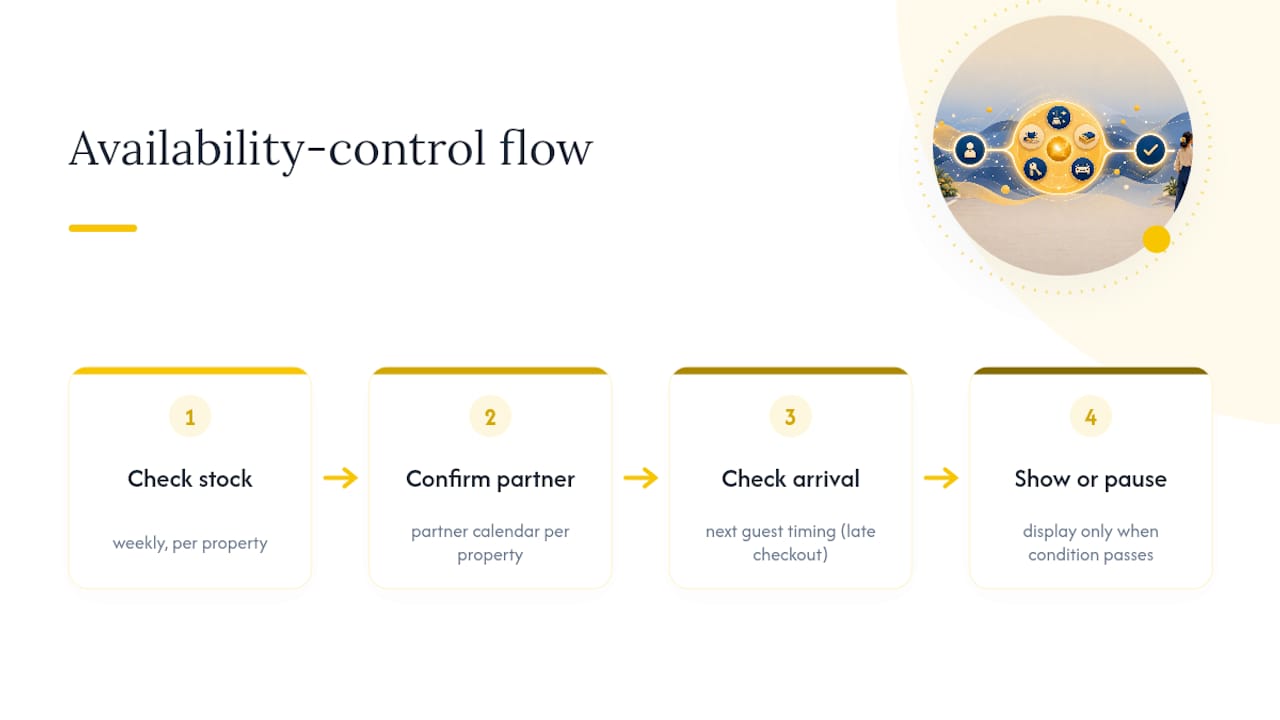
Tie every physical or partner-dependent add-on to a real availability check, not a static “always offered” listing. For items you fulfill yourself, like a welcome basket, this means checking your own stock before the offer goes out, particularly during high season when you might be running several properties at once. For partner-fulfilled items like transfers, this means confirming the partner’s calendar before your automated message fires, not after the guest has already paid.
Build a simple weekly routine: check stock on physical items, confirm partner availability for the coming week, and pause any offer you can’t currently deliver rather than leaving it live and hoping. If you manage multiple properties, this check needs to happen per property, since a partner covering one neighborhood may not cover another.
Calendar-aware automation helps here too. A system that only surfaces the transfer offer when your partner has confirmed capacity, or only shows the late checkout option when the next guest isn’t arriving early, prevents you from selling something you can’t deliver.
How Do You Train Staff or Partners to Deliver Consistently?
A great extra services menu falls apart if the person fulfilling the order doesn’t match the promise. This matters more once you’re delegating fulfillment to cleaners, drivers, or shopping partners instead of doing it yourself.
Write a one-page standard for each paid extra: what’s included, the acceptable delivery window, and what “done right” looks like. For a welcome basket, that means a specific contents list, not “some snacks.” For a mid-stay clean, that means which rooms and what gets restocked. Vague instructions produce inconsistent results, and inconsistent results show up in guest reviews.
Before any new partner goes live on your menu, run one or two test fulfillments yourself, or have someone you trust check the first delivery. Catching a shortfall in the first order is far cheaper than catching it in a guest complaint.
For ongoing quality, a short feedback loop works better than a rulebook. Ask guests a single follow-up question after they use a paid extra (“Did the welcome basket meet your expectations?”) and pass that answer directly to the person or partner who fulfilled it. This closes the loop fast and keeps standards from drifting over the months.
What Legal and Tax Rules Apply to Paid Guest Extras?
Selling add-ons doesn’t change your core compliance obligations, but it does add income you need to record correctly. Revenue from paid extras is business income like your nightly rate, and it needs to be declared and taxed accordingly under whatever regime applies to your accommodation activity.
Keep a receipt for every paid extra, tied to the specific booking, not lumped into a general “extras” bucket at the end of the month. This matters for two reasons: it protects you if a guest disputes a charge, and it gives your accountant a clean record instead of a reconstruction job at tax time. A digital record that logs the add-on, the price, the guest, and the date removes the guesswork later.
If you’re renting out equipment, arranging transfers, or acting as an intermediary for a local experience, check whether that specific service triggers a different regulatory category in your region. Rules on this vary by activity type and by autonomous community, so a service that’s a simple retail sale in one context might carry different obligations in another. When in doubt, confirm with a local tax advisor rather than assuming your accommodation license covers every add-on automatically.
None of this changes your obligation to register guest stays through the standard channels. Paid extras are a separate revenue stream sitting on top of your existing compliance requirements for tourist accommodation, not a replacement for them.
How Do You Promote Extras Without Annoying Guests?
The line between a helpful offer and a nuisance is narrow, and guests notice fast when a stay feels like a sales funnel instead of a place to relax.
Limit yourself to two touchpoints before arrival and one during the stay. More than that, and even a genuinely useful offer starts to feel like spam. Frame every message around a real problem the guest has, not a product you want to move: “avoid a delayed checkout” lands better than “buy our late checkout add-on.”
Never repeat an offer a guest already declined. If they said no to the grocery box, don’t send it again two days later. Instead, use that silence as information: they either don’t need it or didn’t see it, and either way, a second identical message just reads as pressure.
Keep the tone consistent with the rest of your guest communication. If your check-in messages are warm and personal, don’t switch to a hard-sell voice the moment money is involved. A thoughtful guest experience strategy treats the extra services menu as one more way to be helpful, not a separate sales channel bolted onto the stay.
How Should You Design the Menu Itself?
A cluttered menu kills conversion faster than a bad price. Guests skim on their phones between other tasks, so your menu needs to work in under ten seconds of attention.
Show no more than three to four items at once, each with a name, a one-line benefit, and a clear price. Drop anything that reads like a legal disclaimer or a paragraph of fine print above the payment button. Use plain photos where you can, a real photo of the welcome basket contents outperforms a stock image, because it sets accurate expectations and reduces post-purchase disappointment.

Order matters too. Lead with whichever item has the highest take rate historically, since guests spend more attention on the first option they see. Group by timing rather than by category: what’s relevant now (late checkout, if arrival is imminent) should sit above what’s relevant later (mid-stay clean, if they’ve just checked in).
A Quick-Play Checklist for Busy Operators
Pick two offers, not five. Early check-in or late checkout, plus a welcome box, cover most of your realistic upside with the least setup. Automate the messaging so it fires on schedule without you remembering, then leave it alone for your first 30 bookings before touching pricing or timing.
Review that batch honestly: which offer converted, which stalled, and whether fulfillment ran clean. Delegate delivery early, but verify the first few yourself. The most common trap isn’t picking the wrong add-on. It’s adding a fourth and fifth item before the first two are running smoothly.
— Sofía Herrera
Sell Extra Services Without Leaving Your Check-In Flow
A check-in platform can turn your check-in process into the place where these offers actually get sold, instead of a separate app or a manual message you have to remember to send. You create a service, guests pay by Apple Pay or Google Pay in seconds, and it’s live in about two minutes with no IT setup involved.

Because guest check-in, calendar sync across Airbnb, Booking, and more than a dozen other platforms, and SES Hospedajes reporting already run through the same platform, there’s no duplicate guest record to maintain and no separate compliance tool to manage alongside your upsell system. Every paid extra generates its own receipt automatically, and your data stays hosted within the EU, which matters if you’re also tracking invoice-level expenses across multiple properties. If you’re ready to see how add-ons fit into a compliant, automated check-in flow, start a free trial and walk through how EuroCheckin’s registration and reporting features work with a live property.
Sources
For pricing and timing benchmarks, the Houfy guide to vacation rental upsells, GuestIntro’s upselling playbook, and StayStrat’s upselling strategy breakdown informed the price bands and timing rules above. For compliance and setup, see EuroCheckin’s SES Hospedajes guidance for hotels and check-in software selection factors.
- Vacation Rental Upsells: Add $200+ Per Booking
- Vacation Rental Upselling: How to Sell Extras to Guests
- 11 Vacation Rental Upselling Strategies That Add $2,000+ Per Year in Revenue — StayStrat
FAQ
What Is an Extra Services Menu?
It’s the priced list of optional add-ons, like early check-in, a welcome basket, or a grocery pre-stock, that guests can select and pay for before or during their stay.
Which Add-Ons Convert Best for New Operators?
Early check-in or late checkout and a welcome basket convert fastest because they need no external vendor, with typical take rates of 15 to 30% at €20 to €85 price points.
When Should I Send Upsell Offers to Guests?
Send welcome basket and grocery offers 48 to 72 hours before arrival, and late checkout offers two days before departure, since this timing consistently outperforms one-time or scattered messages.
How Many Items Should Be on the Menu?
Two to three items per message performs better than a long list, since offering too many choices can reduce conversion rates.
Can I Sell Extra Services Directly Through My Check-In Tool?
Yes. EuroCheckin lets you create and sell paid add-ons inside the guest check-in flow, with payment through Apple Pay or Google Pay and a new service added in about two minutes.


