


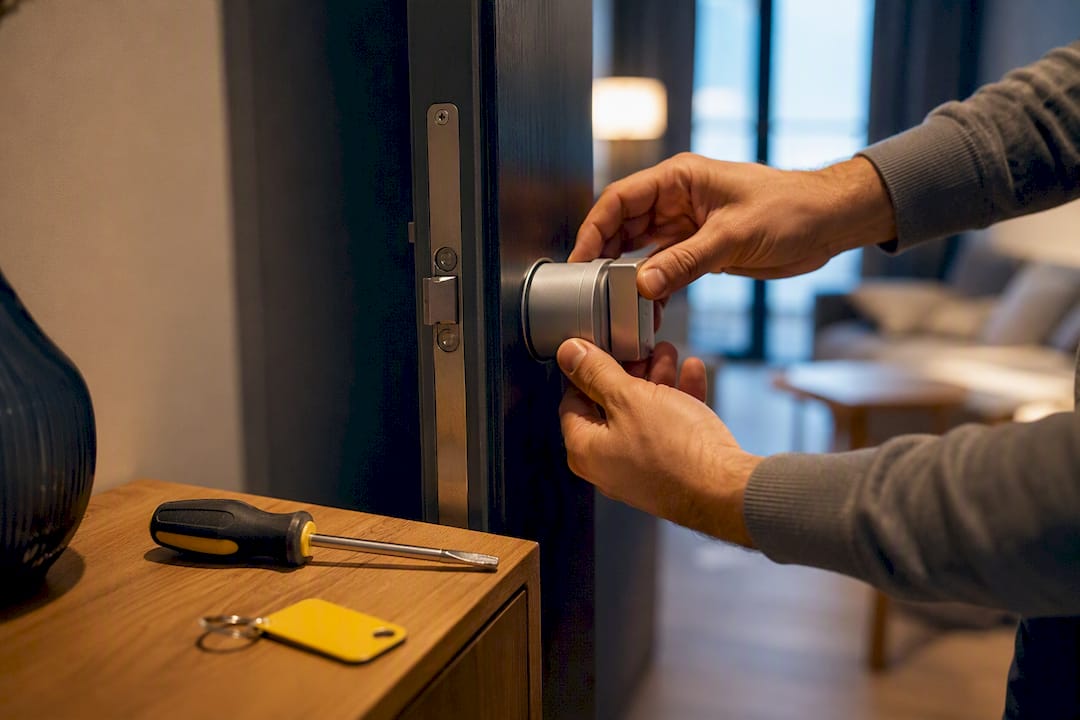
Nuki self check-in gives guests time-limited access through three methods: a Nuki App invitation, a 6-digit keypad code, or a Web link. Access ties directly to the reservation dates in your booking system, so it activates and expires on its own. Once you connect Nuki to a property management system, guests can arrive and unlock the door at 2 a.m. with zero staff involvement.
TL;DR:
- Nuki’s self check-in methods include app invitations, keypad codes, and Web links, each suited to different guest tech levels and connectivity needs.
- Access is automatically scheduled based on reservation dates, with invitations dispatched 72 hours before check-in and expiring after checkout.
- Hosts should implement backup solutions like physical lockboxes and monitor device batteries to prevent guest lockouts.
- All credentials are time-bound and cryptographically secured, ensuring guest access is limited to the booked stay and removed afterward.
- Integrating EuroCheckin with Nuki automates guest registration, calendar management, and legal compliance, reducing administrative workload.
Table of Contents
- What Are the Three Nuki Self Check-In Methods?
- When Do Guests Get Access, and How Long Does It Last?
- How Do You Set Up Nuki Smart Hosting for Automated Check-In?
- What Fail-Safes Prevent Guest Lockouts?
- How Secure Is Nuki Self Check-In?
- What Happens to Guest Data During Nuki Self Check-In?
- How Does Nuki Compare to Other Smart Lock Systems?
- Is Automated Nuki Self Check-In Actually Worth It?
- How EuroCheckin Fits Into a Nuki Self Check-In Setup
- Sources
- FAQ
What Are the Three Nuki Self Check-In Methods?
Each unlocking method suits a different kind of guest, and choosing the right one (or offering all three) shapes how smooth arrival day feels.
The Nuki App invitation requires guests to download the app and redeem a code you or your system sends them. Once redeemed, the phone unlocks the door over Bluetooth, meaning the guest needs the app installed and Bluetooth turned on, but not necessarily an internet connection at the door.
The 6-digit keypad code skips the app entirely. Guests punch the code into a physical Nuki Keypad mounted outside the door. It’s the most familiar option for less tech-savvy travelers and works even if a guest’s phone dies.
The Web link lets a guest tap a link sent by text or email to unlock without installing anything. According to Nuki’s Smart Hosting documentation, Web links require location services enabled and an active mobile internet connection, since the system validates the guest’s proximity to the lock before granting access.
- App invitation: best for tech-comfortable guests who’ll return, no cellular signal needed at the door
- Keypad code: best for groups, elderly guests, or spotty phone battery situations
- Web link: best for one-time guests who don’t want a new app, but only works with data or Wi-Fi
Offering two of the three covers nearly every guest scenario without you having to guess who prefers what.
When Do Guests Get Access, and How Long Does It Last?
Nuki automates the timing so you don’t have to send codes manually for every booking. Nuki’s support documentation confirms the system dispatches access invitations by default 72 hours before check-in, once your booking channel or PMS has synced the reservation dates.
- Default dispatch window. The 72-hour default gives guests enough lead time to download the app or save the link before travel day, without exposing the door code too far in advance.
- Automatic expiration. Access permissions map directly to the booking’s check-in and check-out times, and Nuki deactivates and deletes credentials automatically once the stay ends.
- Editing the default for a listing. You can change the standard access window in Nuki Web so every future booking for that property follows a new schedule, whether you want earlier arrivals or later checkouts as your norm.
- Manual overrides per booking. A single guest asking for a 10 a.m. early check-in doesn’t require changing your whole setup. Adjust that one reservation’s access times directly in Nuki Web without touching the listing default.
This lifecycle is what separates automated Nuki self check-in from a host manually texting codes every morning. The system does the work; you only intervene for exceptions.
How Do You Set Up Nuki Smart Hosting for Automated Check-In?
Getting from a boxed Nuki Smart Lock to fully automated guest access takes a handful of concrete steps, most of which you’ll only do once per property.
Start with the physical install: mount the Smart Lock over your existing cylinder, pair it with the Nuki Bridge or your Wi-Fi network so it’s reachable remotely, and confirm the door secures properly with a manual test before you hand off access to anyone.
From there, move into Nuki Web:
- Activate Smart Hosting and add your property as a listing
- Connect your PMS or booking channel (Airbnb, Booking.com, or a channel manager) so reservation dates flow in automatically, which is what triggers the automated access permissions tied to each booking
- Choose which invitation types you’ll offer per listing: app, keypad, Web link, or a combination
- Confirm your default access window and notification preferences, so you get alerted when invitations go out or fail to send
Pro Tip: Test the entire flow yourself before your first real guest arrives. Book a fake reservation with an end date tomorrow, and walk through redeeming your own invitation exactly as a guest would.
Once the PMS link is live, every new booking generates its own access window without you touching Nuki Web again.
What Fail-Safes Prevent Guest Lockouts?
Automation reduces your workload, but it doesn’t eliminate every failure point. Dead phone batteries, weak Wi-Fi, and guests who never open their invitation email are real, recurring problems, and a good operation plans around them before they happen.
- Build in a grace period. Practitioners recommend setting access to open roughly an hour before the stated check-in and stay open until 24 hours after checkout, a buffer that absorbs minor flight delays and slow checkouts without generating a single support ticket.
- Keep a low-tech backup. A physical lockbox with a spare key or a separate master code for your cleaning team covers the scenario where the Nuki system itself is briefly unreachable. Document this fallback in your digital house guide.
- Monitor battery and connectivity. Nuki devices send low-battery alerts. Don’t ignore them. A lock that dies mid-stay is the single most preventable five-star review you’ll ever lose.
- Train your cleaning and maintenance staff on the master procedure separately from guest-facing invitations, so turnover day never depends on a guest’s phone working.
Common quick fixes:
- Guest can’t redeem the code: Resend the invitation link manually from Nuki Web; check that the guest’s stay dates are correctly synced.
- Bluetooth pairing fails: Have the guest close and reopen the Nuki App, or fall back to the keypad code if one’s installed.
- Dead battery at the door: This is exactly why the lockbox backup exists. Point the guest to it in your house guide, then swap the lock’s batteries as soon as possible.
How Secure Is Nuki Self Check-In?
Nuki’s security model is built around a simple principle: guests never get standing, unlimited access. Every credential, whether it’s an app invitation, a keypad code, or a Web link, is time-bound and cryptographically secured, tied to a specific booking, and expires automatically once the stay ends.
Nuki’s own support documentation is explicit on this point: remote guest access is not permitted, and access permissions are deactivated and deleted automatically once a stay concludes. That’s a deliberate constraint, not a limitation, since it means a lost phone or a leaked code becomes useless the moment checkout passes.
Hosts should still verify which invitation type and expiry window applies to each booking, and retain access logs where local regulations require them. This is where a compliance layer matters as much as the lock itself. EuroCheckin’s guest registration tools pair with Nuki by automating the digital guest register, syncing booking calendars, and generating e-signed contracts, so the access control and the legal paperwork move in lockstep rather than as two disconnected systems.
What Happens to Guest Data During Nuki Self Check-In?
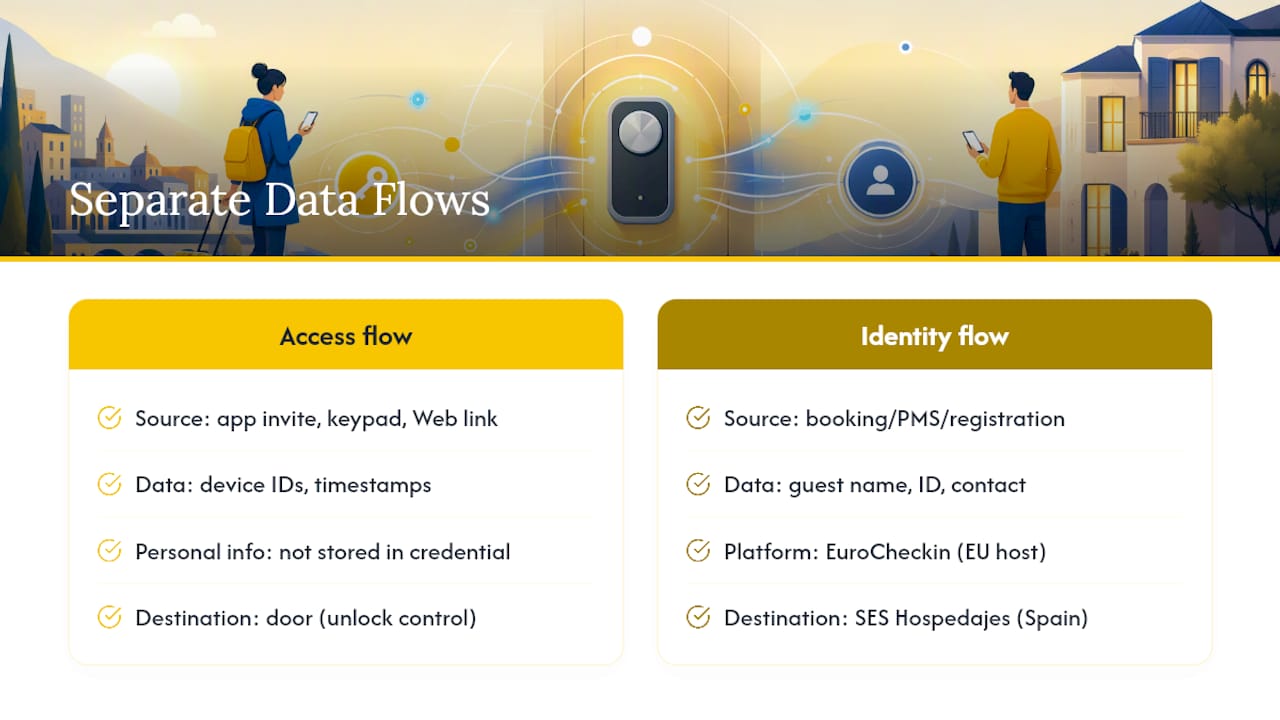
Nuki self check-in generates a specific data trail: names or contact details tied to invitations, timestamps of when codes or links were redeemed, and device identifiers for Bluetooth pairing. Understanding where that data lives, and who can see it, matters for hosts operating under GDPR or similar frameworks.
The access credentials themselves (the app invite, the keypad code, the Web link) carry no personal information beyond what’s needed to validate the booking window. Nuki doesn’t store a guest’s browsing or location history beyond the proximity check required to unlock a Web link. Once a stay ends, the credential is deleted, not archived indefinitely.
Where hosts need to be more careful is the layer above the lock: your PMS, booking channel, and any guest registration system you use alongside Nuki. If you’re renting in Spain, guest identity data collected for legal reporting purposes falls under Real Decreto 933/2021, which requires submission to SES Hospedajes, separate from anything Nuki itself handles. A platform like EuroCheckin is built to keep that identity data on infrastructure hosted within the EU and to avoid duplicate records across systems, which matters more than most hosts realize until an audit asks where guest data actually lives.
Practically, this means treating Nuki’s access credentials and your legal guest registry as two separate data flows. One controls the door. The other satisfies the government. Keeping them cleanly separated, but both automated, is what a modern self check-in setup actually looks like.
How Does Nuki Compare to Other Smart Lock Systems?
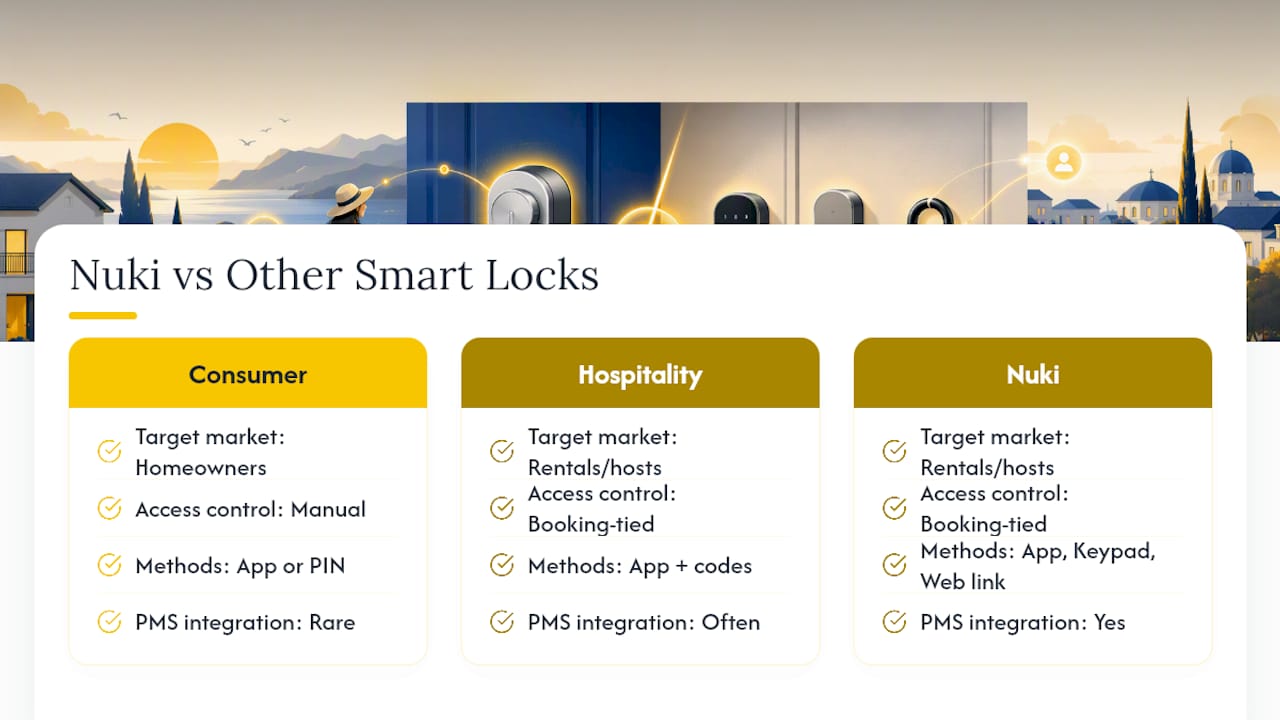
Most smart lock systems marketed to short-term rental hosts fall into two camps: consumer-grade locks built for homeowners, and hospitality-specific platforms built around bookings. Nuki sits firmly in the second camp, and that distinction shows up in the details.
A basic consumer smart lock typically offers one unlock method (usually an app or a fixed PIN) and requires you to manually create and revoke each guest’s access. Nuki’s Smart Hosting layer instead ties access directly to reservation dates pulled from a PMS or booking channel, so codes generate and expire without you touching the app for every checkout.
The three-method flexibility, app, keypad, and Web link, is also less common among general-purpose smart locks, many of which force every guest through the same app regardless of their comfort level. That matters more than it sounds: a keypad code works for a guest who’s never used a smart lock, while an app-only system quietly filters out anyone unwilling to install software before their vacation.
Where hospitality-focused competitors sometimes match Nuki is in PMS integrations and automated dispatch timing. The real differentiator tends to be how cleanly the lock system connects to the rest of a host’s stack, which is exactly the gap a platform like EuroCheckin is built to close, linking Nuki (along with TTLock and Yale) to guest registration, contracts, and calendar sync in one place rather than three separate logins.
Is Automated Nuki Self Check-In Actually Worth It?
The time savings are real. Hosts who automate check-in stop fielding 11 p.m. texts asking where to find the key, and guests consistently rate contactless arrival higher when it just works. That’s the upside conventional wisdom already knows.
What gets skipped is that automation doesn’t remove your responsibilities, it relocates them. You still own battery maintenance, backup planning, and making sure your PMS sync is actually current before a guest lands at your door expecting a working code.
Where I think this pays off fastest is pairing the lock with a platform that automates the paperwork sitting next to it. EuroCheckin doesn’t replace Nuki, it removes the separate manual step of registering every guest and syncing every calendar by hand, which is usually the part hosts actually dread.
— Sofía Herrera
How EuroCheckin Fits Into a Nuki Self Check-In Setup
Nuki handles the door. EuroCheckin handles everything else a host still has to do by hand: sending invitations tied to the right booking, keeping calendars aligned across platforms, and filing the paperwork regulators require.

EuroCheckin automates the administrative side that Nuki self check-in doesn’t touch. It dispatches digital check-in forms and syncs your calendar across Airbnb, Booking, Vrbo, and over a dozen other channels, so an overbooking never triggers a guest showing up to an already-occupied lock. On the compliance side, it submits guest data automatically to SES Hospedajes under Real Decreto 933/2021, generates e-signed digital contracts and house rules, and sends a digital guest guide alongside the Nuki access credential. Hosts running Nuki locks can plug straight into these check-in automation features without changing how guests unlock the door.
EuroCheckin offers subscription plans per accommodation, with a free trial available to test the integration before committing. If you’re already running Nuki and want the registration and calendar side automated too, start a free trial and connect your first listing today.
Sources
FAQ
What Is Nuki Self Check-In?
Nuki self check-in is an automated guest access system that lets renters unlock a property using a Nuki App invitation, a keypad code, or a Web link, without a host present.
Does Nuki Self Check-In Work Without an App?
Yes. Guests can use a physical keypad code or an emailed Web link instead of installing the Nuki App, though Web links require location services and mobile data.
How Far in Advance Do Guests Get Their Access Code?
By default, Nuki sends access invitations 72 hours before check-in, though hosts can adjust this timing in Nuki Web.
Can a Guest Access the Property Remotely Before Arrival?
No. Nuki’s system explicitly disallows remote guest access, and credentials only activate within the booked stay window.
Does EuroCheckin Work With Nuki Locks?
Yes. EuroCheckin integrates with Nuki smart locks alongside guest registration, calendar sync, and digital contracts to automate the workflow around self check-in.


