



To export your Airbnb calendar, go to your Hosting dashboard, click Calendar, select the listing, and open Availability or the gear icon. Choose Sync calendars, then Export calendar, and copy the link Airbnb generates for you. That link ends in .ics, and it’s the only thing you need to connect Airbnb to Google Calendar, Apple Calendar, or an OTA like Booking.com or VRBO.
Once you have it, paste it into the destination calendar’s import or subscription field. Most platforms have a field labeled “import calendar” or “add by URL.” Here’s the quick version:
- Copy the .ics export link from Airbnb’s Sync Calendars screen.
- Paste it into the target calendar’s import field (Google, Apple, Booking.com, VRBO).
- Check the destination platform for a “last imported” or sync status message to confirm it worked.
Key Takeaways
Exporting an Airbnb calendar means copying a private .ics link from the Sync Calendars screen and pasting it into a destination calendar, which then pulls updates on its own schedule rather than in real time.
| Point | Details |
|---|---|
| Find the export link | Go to Calendar → select listing → Availability → Sync calendars → Export calendar to copy the .ics URL. |
| Understand the direction | Export sends Airbnb data out; import pulls another calendar in. They are separate actions. |
| Expect delays, not instant updates | Airbnb, Booking.com, and Google Calendar each pull the feed on their own multi-hour schedule. |
| Check for silent failures | Watch the “Last imported” timestamp; a gap over 24 hours usually signals a broken feed. |
| Guard the URL like a password | Reset it if leaked, and update every destination the same day. |
| Scale beyond manual exports | Eurocheckin automates sync across Airbnb, Booking, Vrbo, and 12+ platforms with faster refresh and built-in compliance reporting. |
Table of Contents
- How Airbnb iCal Sync Actually Works
- How Do I Export My Airbnb Calendar From a Desktop?
- Can I Export the Airbnb Calendar From the App?
- Where Do I Paste the .ics Link on Each Platform?
- How Often Does the Exported Calendar Refresh?
- Why Isn’t My Airbnb Calendar Syncing Correctly?
- What Does the Exported Calendar Reveal, and How Do I Revoke Access?
- When Should You Stop Manually Exporting and Automate Instead?
- Stop Juggling Feeds: Sync Everything From One Place
- Sources
- FAQ
How Airbnb iCal Sync Actually Works
Airbnb’s calendar system runs on a technology called iCal, and it’s one-directional by design. Export means Airbnb hands your listing’s availability to another calendar. Import means you’re pulling someone else’s calendar into Airbnb. They’re separate actions, and doing one doesn’t automatically do the other.
iCal is also pull-based, not push-based. The destination calendar checks Airbnb’s .ics feed on its own schedule. Airbnb doesn’t send updates the moment something changes.
What actually transfers is limited. Blocked dates and all-day availability blocks sync. Guest names, phone numbers, payout amounts, and reservation details do not.
That limitation creates real operational gaps for hosts:
- A booking made minutes ago might not show up on Google Calendar or an OTA for hours.
- A failed import can sit silently with no error message, just a stale calendar.
- Cross-importing across more than two or three platforms multiplies the number of feeds you have to babysit.
Pro Tip: Treat your .ics URL like a password. Anyone who has it can see your blocked and available nights. If you’ve ever pasted it into a public spreadsheet or shared it in a group chat, reset it and update every calendar that uses it, the same day.
How Do I Export My Airbnb Calendar From a Desktop?
The desktop flow is the most reliable path, and it takes under two minutes once you know where to click.
- Log in to Airbnb and open your Hosting dashboard.
- Click Calendar in the left navigation.
- Select the specific listing whose calendar you want to export (each listing has its own .ics link).
- Click Availability or the gear icon near the top of the calendar view.
- Choose Sync calendars.
- Click Export calendar, then copy the URL Airbnb displays.
Before you go further, confirm the link actually works. Paste it into a new browser tab. A valid feed either downloads an .ics file or shows raw text starting with BEGIN:VCALENDAR. If you see a login screen or a blank error page instead, something’s wrong with the link and you’ll need to regenerate it from the Sync Calendars screen.
Pro Tip: After pasting the URL into a destination platform, look for a field labeled “Last imported” or “Last synced.” That timestamp is your fastest way to check whether the connection is actually pulling fresh data, not just sitting there looking connected.
Can I Export the Airbnb Calendar From the App?
The mobile flow mirrors desktop closely, whether you’re on the Airbnb Hosting app or mobile web.
- Open the Airbnb app and tap Today or Menu, then find your listing.
- Tap Calendar.
- Tap Availability or the settings icon.
- Select Sync calendars.
- Tap Export calendar and copy the link.
Mobile web sometimes trims down the interface compared to the app, so the option to copy a long .ics URL isn’t always as easy to grab with a thumb. If you can’t find “Sync calendars” anywhere on your phone, switch to a desktop browser. The full Airbnb hosting dashboard always has the export option, and copying a long link is far less fiddly with a mouse and keyboard.
Where Do I Paste the .ics Link on Each Platform?
Once you have Airbnb’s export URL, each destination has its own import spot.
- Google Calendar: On desktop, go to Other calendars in the left sidebar, click the plus icon, choose From URL, and paste the .ics link. Google subscribes to the feed and refreshes it on its own internal schedule, which can lag behind real-time bookings.
- Apple Calendar: On a Mac, open Calendar, go to File → New Calendar Subscription, and paste the URL. On iPhone or iCloud.com, add it as a subscribed calendar under calendar settings. Apple’s refresh timing varies and isn’t adjustable by you.
- Booking.com: In the extranet, find Calendar & Pricing → Sync calendars, and paste Airbnb’s .ics link into the import field. Booking.com converts imported events into blocked dates only, not full reservation details.
- VRBO: Under calendar settings, locate the iCal import option and paste the same link. VRBO renders imported bookings as blocked nights, the same pattern most channel managers use, including tools like Your.Rentals.
How Often Does the Exported Calendar Refresh?
Every platform pulls the .ics feed on its own timetable, and none of them update instantly. As a practical range, Airbnb tends to import external feeds roughly every 2 to 4 hours, Booking.com every 2 to 6 hours, and Google Calendar often much slower than either.
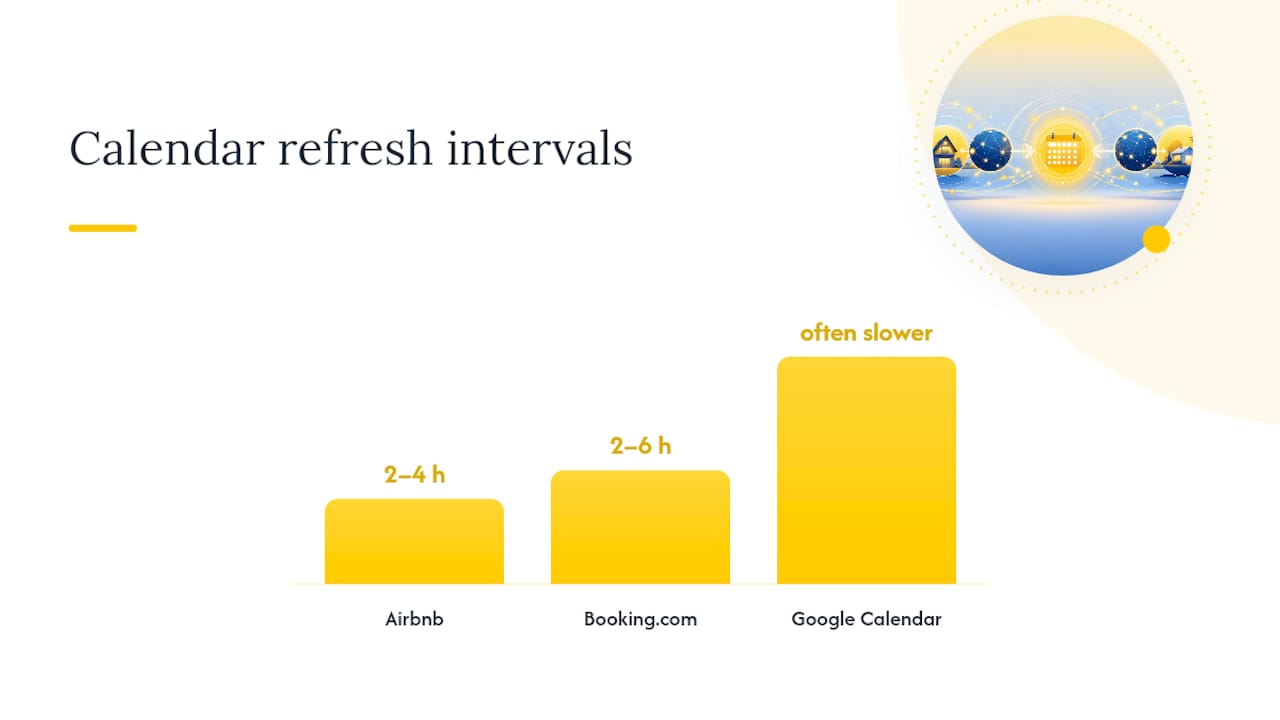
The tricky part is that failures are usually silent. A destination platform won’t flag a broken import with a red warning banner. It just keeps showing whatever it last successfully pulled, which might be days old.
Watch for these limitations:
- Refresh isn’t real-time, no matter which platforms you connect.
- Some destinations cap how many external calendars they’ll import per listing.
- All-day blocks and timed events don’t always translate cleanly between systems.
- Time zone settings can shift a blocked night by a day if they’re misconfigured.
If you take same-day bookings, don’t rely on iCal sync alone to prevent double bookings. The gap between a reservation happening and it appearing elsewhere can run several hours, which is plenty of time for a conflicting booking to slip through on another platform.
Why Isn’t My Airbnb Calendar Syncing Correctly?
When a calendar looks frozen or a booking never shows up elsewhere, work through this checklist in order.
- Paste the export URL into a browser directly. It should return
BEGIN:VCALENDAR, not a login page or blank screen. - Confirm the destination platform is still pointed at your current export URL, not an old one from before a reset.
- Check the “Last imported” timestamp on the destination. Anything beyond roughly 24 hours usually means the feed has gone stale or broken.
- If the timestamp hasn’t moved in days, delete the import on the destination platform and re-add it. This resets internal failure counters that some platforms use after repeated failed fetch attempts, and simply re-saving the same URL sometimes isn’t enough to restart polling.
- If you reset your Airbnb export URL for any reason, update every platform where you pasted the old one, the same day.
Other less obvious causes include a platform outage on the destination’s end, or a feed format mismatch where timed events get dropped instead of read as all-day blocks. Running through the checklist above isolates most of these within a few minutes.
What Does the Exported Calendar Reveal, and How Do I Revoke Access?
Your .ics feed generally shows only booking dates and blocked nights. No guest names, no payout figures. Still, treat the URL like a password. Anyone holding it can see your full availability picture.
- Never paste the export link somewhere public, like a shared spreadsheet or a forum post.
- Reset the URL immediately if you suspect it leaked. The old link stops working the instant you do.
- Update every destination calendar with the new URL the same day you reset it.
- Limit how many places you import the feed into, since fewer copies mean fewer places to fix later.
When Should You Stop Manually Exporting and Automate Instead?
Manual .ics export works fine for one or two platforms and a handful of listings. Past that, the math turns against you. Every added OTA means another URL to copy, another import field to babysit, another silent failure to catch.
Automate when you’re taking same-day bookings, managing more than two OTAs, or need faster conflict detection than a multi-hour polling window allows. Automated synchronization between Airbnb and Booking adds monitoring and quicker refresh cycles that manual iCal links can’t match, though it comes with a subscription cost and a short setup step worth weighing against your portfolio size.

Stop Juggling Feeds: Sync Everything From One Place
Copying and pasting .ics links works until you’re managing five properties across three platforms and one gets missed. Eurocheckin replaces that manual routine with automatic calendar synchronization across Airbnb, Booking, Vrbo, and more than 12 other platforms, polling far faster than the multi-hour windows most iCal feeds run on.

Beyond the calendar, Eurocheckin handles the legal side hosts in Spain can’t skip: automatic guest reporting to SES Hospedajes under Real Decreto 933/2021, with everything hosted on EU-based infrastructure. You get real-time alerts when a booking lands, so double-booking risk drops instead of hiding in a stale feed. If you’re managing more than a couple of listings across platforms, explore Eurocheckin’s calendar sync and compliance features and start a free trial to see your calendars merge into one view.
Sources
- Sync your home host calendar to other websites — Airbnb Help Center
- Sync your Airbnb calendar with your Google Calendar — Airbnb Help Center
- Syncing your Booking.com calendar with third-party calendars — Booking Partner Help
- How do I import my iCal or Google calendar — VRBO Help
- Importing Airbnb calendar to Your.Rentals - Help Center
FAQ
How do I export my calendar from Airbnb?
Go to your Hosting dashboard, click Calendar, select the listing, choose Availability, then Sync calendars, and click Export calendar to copy the .ics link.
How do I export the entire calendar, not just one listing?
Airbnb generates a separate .ics export link for each listing individually. If you manage multiple properties, you’ll need to repeat the export steps for each one, or use a tool like Eurocheckin that consolidates multiple listings into one synced view.
Can I export my Airbnb calendar to Google Calendar?
Yes. Copy Airbnb’s .ics link, then in Google Calendar go to Other calendars → From URL, and paste it. Google refreshes the feed on its own schedule, so updates aren’t instant.
Can you export data from Airbnb, or just availability?
You can export blocked dates and availability through the .ics calendar feed, but guest names, prices, and reservation details don’t transfer. For full data and automated compliance reporting, a platform like Eurocheckin pulls booking details directly rather than relying on the limited iCal format.


