



For most property managers, the Airbnb API is the safer, higher-performing choice. It syncs in near real time and carries far more booking data than a calendar link ever will. iCal still earns a place for single-unit hosts or niche channels without API support, but it runs on a delayed refresh schedule that leaves a real window for double bookings. The comparison below breaks down sync speed, data depth, and setup cost, and a tool like Eurocheckin shows what automated, API-driven compliance and calendar sync looks like in practice.
TL;DR:
- Using API connections reduces overbooking risk significantly by providing near real-time updates, while iCal refreshes can lag by an hour or more.
- API access offers detailed data like guest information and dynamic pricing, enabling automation of messaging, rates, and restrictions, unlike the limited data in iCal.
- Implementing API requires a certified channel manager and incurs setup costs, whereas iCal is free and simple but less reliable for high-volume or fast-moving listings.
- For portfolios with more than two listings or high-velocity channels, switching to API is strongly recommended to prevent operational errors.
- Migrating from iCal to API should be a controlled process, involving parallel running during transition to avoid data mismatches and booking issues.
Table of Contents
- Airbnb iCal vs API: A Side-by-Side Comparison
- What Is Airbnb iCal and How Does It Actually Work?
- What Is an API Connection and What Does It Enable?
- Pros and Cons: What Each Method Costs You in Practice
- How Do You Decide Which One Fits Your Portfolio?
- Migrating From iCal to API Without Creating a Gap
- Setting Up iCal and API Access on Airbnb
- Security and Privacy: Which Method Exposes More Data?
- How Sync Method Affects Listing Visibility and Revenue
- Why Publisher Expertise on Sync and Compliance Matters Here
- An Editor’s Take: Stop Treating iCal as a Starter Plan
- Eurocheckin: Sync Your Calendars and Stay Compliant in One Platform
- Sources
- FAQ
Airbnb iCal vs API: A Side-by-Side Comparison
The two methods solve the same problem, keeping your calendar accurate, in almost opposite ways. iCal is a static file exchange. API access is a live, authenticated data connection. That structural difference explains nearly every practical gap between them.
| Factor | iCal | API |
|---|---|---|
| Sync speed / latency | Refreshes on a delayed automatic schedule | Near real time, event driven |
| Data transferred | Availability blocks only | Reservation details, guest data, rates, rules |
| Directionality | One way | Two way |
| Automation potential | Minimal | High: pricing, messaging, instant book |
| Double booking risk | Elevated during refresh gaps | Low, updates propagate immediately |
| Setup complexity / cost | Low, free, copy and paste | Moderate, usually needs a certified channel manager |
A few things stand out once you see the rows side by side:
- The gap in sync speed is the whole story: Guesty’s comparison of iCal and API sync notes that iCal updates can lag by an hour or more, while API changes reflect almost instantly.
- Data richness compounds the speed problem. Smoobu’s breakdown of API versus iCal points out that iCal only tells you a date is blocked, not who booked it, what they paid, or what house rules apply.
- Setup cost is the one place iCal wins outright. It requires no integration fee and no certified partner, which is exactly why it survives as a fallback for secondary channels.
What Is Airbnb iCal and How Does It Actually Work?
iCal is a calendar feed. Airbnb generates a unique URL for your listing, and any other platform, or your own calendar app, can subscribe to that URL to pull your availability. It works in one direction only: the receiving calendar polls Airbnb’s feed on a schedule and copies over whatever it finds. Airbnb never gets updates back through that same link.
The catch is the polling interval. Airbnb’s own help documentation confirms that iCal calendars refresh on a delayed automatic schedule rather than updating instantly. That delay is not a bug, it is how the protocol was designed to work, but it creates a window where a booking on one platform hasn’t yet blocked the same dates on another.
That window matters more than it sounds. Rentals United’s analysis of iCal versus API sync describes how overbooking risk scales disproportionately as you add channels: a single slow refresh cycle that spans three or four platforms multiplies your exposure far faster than the channel count alone would suggest.
What iCal actually transmits:
- Blocked or available date ranges
- A generic “reserved” label with no guest name
- No rate information
- No cancellation policy or house rule data
- No guest contact details or message threads
What it leaves out is the part that trips people up. You cannot build automated welcome messages, dynamic pricing rules, or guest verification workflows on top of an iCal feed, because the feed simply doesn’t carry that information.
Pro Tip: If you’re stuck on iCal for a niche channel that has no API, tighten the refresh interval on the receiving side if the platform allows it, and manually block a buffer night around every confirmed reservation as insurance against the sync gap.
iCal still makes sense in specific situations: a single host running one listing on a slow-moving regional site, a vacation rental owner listing a boat slip or parking spot with almost no booking velocity, or a secondary channel that Airbnb’s own certified partner network simply doesn’t support yet. Outside those cases, the risk starts outweighing the convenience fast.
What Is an API Connection and What Does It Enable?
An API connection replaces the polling model with a live, authenticated data pipeline. Instead of one system periodically checking another’s calendar file, both platforms exchange structured data through secure tokens, often triggered by webhooks that fire the instant something changes, a new booking, a cancellation, a price update. There’s no waiting for the next scheduled refresh, because there isn’t one.
Smoobu’s technical comparison describes this as genuinely two-way: your channel manager can push rate changes and availability rules out to Airbnb, and Airbnb pushes reservation and guest data back, all in the same connection.
That two-way flow carries a lot more than a blocked date. A typical API sync includes:
- Full reservation details, including guest name and contact information
- Nightly rates and any date-specific pricing rules
- Minimum-stay and booking restriction settings
- Cancellation policy data
- Guest messages, often routable into your own inbox or CRM
- Instant Book eligibility and status
That data depth is what unlocks automation. Dynamic pricing tools can adjust rates the moment a competitor drops theirs. Automated messaging can fire a check-in guide the second a reservation confirms. Cleaning schedules can update themselves without anyone touching a spreadsheet. Guesty’s guide to choosing a sync method frames this as the real dividing line: API access turns your calendar from a passive record into an operational trigger.
There’s a real prerequisite here worth knowing upfront. Airbnb doesn’t hand out raw API access to individual hosts. You connect through a certified channel manager or property management platform that has already gone through Airbnb’s partner approval process, and most of those tools charge a monthly fee scaled to your number of listings. That’s the trade you’re making: a setup cost and a vendor relationship, in exchange for real-time accuracy and automation you simply cannot build on a calendar link.
Pros and Cons: What Each Method Costs You in Practice
The honest way to compare these two isn’t speed versus cost in the abstract. It’s what each one actually costs you operationally when something goes wrong.
- API cons: cost and dependency. You’re paying a channel manager subscription and relying on a third-party integration staying certified and maintained. If that vendor has an outage, you feel it across every connected platform at once.
- iCal pros: zero cost, zero setup. Anyone can copy a URL into a calendar app in minutes, which makes it genuinely useful for a low-volume secondary channel that isn’t worth paying for API access.
- iCal cons: latency and blind spots. The refresh delay creates a real overbooking window, and because the feed carries no guest or rate data, you can’t automate anything downstream of it.
How Do You Decide Which One Fits Your Portfolio?
Run through this checklist before committing to either method:
- How many listings do you manage? One or two low-velocity units can usually tolerate iCal. Beyond that, the math on overbooking risk starts working against you fast.
- How fast do your peak-season dates fill? High-velocity properties, weekend getaways, event-driven markets, ski season, get booked in the exact hours iCal’s refresh delay is most dangerous.
- How many channels list the same inventory? Every additional platform multiplies the overlap window described in Rentals United’s risk analysis.
- Do you need Instant Book or dynamic pricing? Both require API access to run safely.
- What’s your automation budget? A channel manager subscription needs to pencil out against the labor it replaces.
A workable rule of thumb: if you manage more than two active listings, or any listing on a high-velocity channel, move to API. Keep iCal only for channels that genuinely have no API option.
Pro Tip: When you’re evaluating a channel manager, ask directly about retry behavior on failed syncs, monitoring alerts for dropped connections, and how they handle a webhook outage. A vendor who can’t answer those clearly probably hasn’t built for scale.
Migrating From iCal to API Without Creating a Gap
Switching methods mid-season is exactly when overbooking risk spikes, so treat the migration like a controlled rollout, not a flip of a switch.
- Audit every active calendar connection first. List every channel currently synced, who owns each calendar link, and every date already blocked manually.
- Enable API on your highest-risk channel first. That’s usually your highest-velocity platform, then expand to others once it’s confirmed stable.
- Keep the old iCal feed live but read-only during the transition. Don’t delete it until the API connection has processed at least one real booking successfully.
- Run both systems in parallel for one full booking cycle. Watch for any date mismatch between the two feeds daily during that window.
- Verify the first live booking end to end. Confirm it blocked correctly across every other connected channel within minutes, not hours.
- Set a rollback point. If the API connection misbehaves, know exactly how to revert to iCal without losing your existing blocks.
- Update everything downstream once you’re confident. Automated guest messaging, cleaner scheduling, and smart lock codes should all switch over to reading from the API feed, not the old calendar link.
Setting Up iCal and API Access on Airbnb
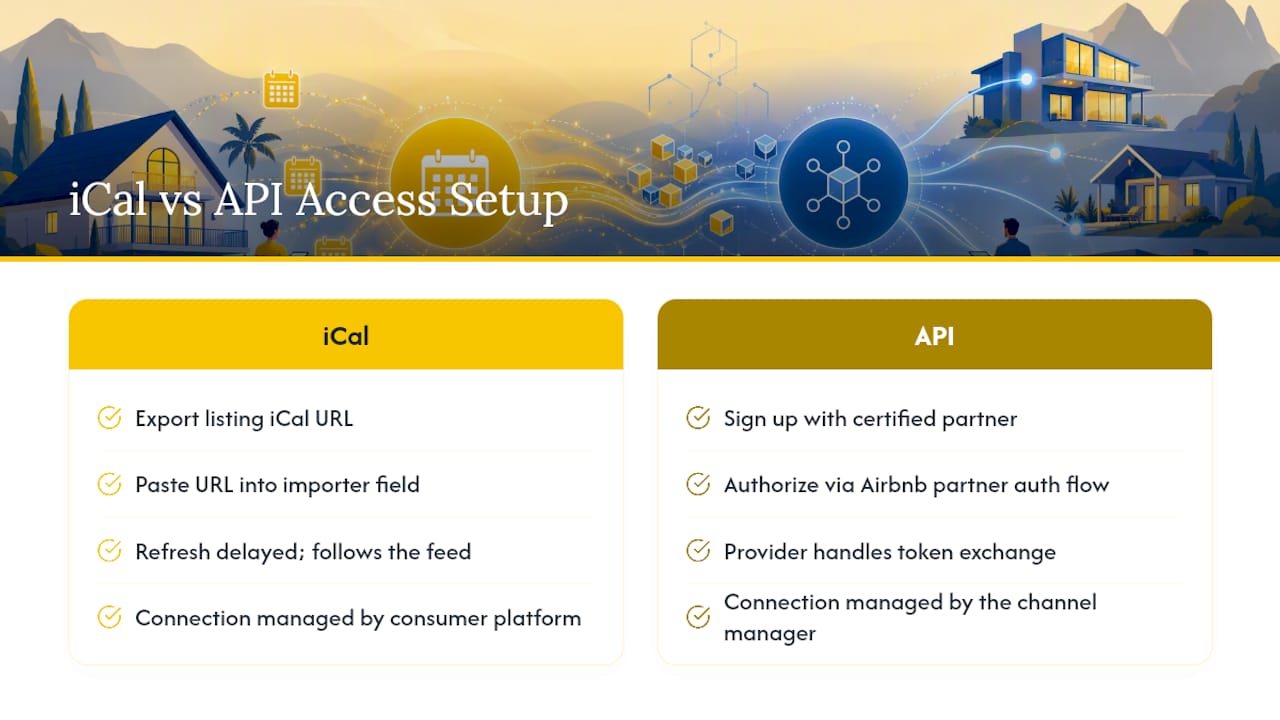
Exporting and importing an Airbnb iCal feed is quick. From your Airbnb calendar, export your listing’s iCal URL, then paste that URL into the import field of whatever platform you’re syncing to, most channel managers and calendar apps have a dedicated field for exactly this, as general iCal connection guides walk through step by step.
Just remember the refresh limitation follows the feed wherever it goes. Airbnb’s own documentation is explicit that these calendars update on a delayed schedule, not instantly, no matter which platform is consuming the feed.
API access works differently at the outset. You don’t get a URL to copy. You sign up with a certified channel manager or property management platform, authorize the connection through Airbnb’s partner authentication flow, and the provider handles the token exchange on the back end. There’s no vendor-specific step to walk through here in general terms, since the exact screens vary by provider, but every legitimate option requires that certified partner relationship rather than a direct, self-served API key.
Security and Privacy: Which Method Exposes More Data?
An iCal URL is, by design, a publicly accessible link. Anyone who has that URL can view your availability data indefinitely, and if it leaks or gets shared into the wrong tool, you have no way to revoke access short of generating a brand-new feed and re-pointing every subscriber to it.
API connections use scoped, authenticated tokens instead. Access can be revoked instantly, permissions can be limited to exactly what a given integration needs, and the exchange happens over an encrypted channel rather than a static public link.
A few practical steps tighten either setup:
- Rotate your iCal URL periodically, especially after removing a channel manager or tool you no longer use.
- Never paste an iCal link into a public forum, spreadsheet shared broadly, or unsecured app.
- Ask any API-based vendor directly how they store guest data and whether that handling meets GDPR requirements, which matters directly for hosts operating under Spain’s guest registration rules.
How Sync Method Affects Listing Visibility and Revenue
Sync choice isn’t just a back-office detail. It touches how your listing performs in search. Instant Book, which platforms consistently favor in ranking, requires the kind of real-time reliability only an API connection can guarantee. Run it on top of an iCal feed and you’re gambling with the refresh delay every single booking.
Hosts stuck on iCal often disable Instant Book altogether to manage that risk, which reduces both visibility and conversion compared to listings that keep it on safely. Dynamic pricing tools face the same wall: they need live rate and availability data to adjust prices intelligently, and a calendar feed that only shows blocked or open dates simply can’t feed that engine.
Why Publisher Expertise on Sync and Compliance Matters Here
This guide was reported by Sofía Herrera, drawing on how Spanish property managers actually operate calendar sync and guest registration side by side, since in Spain those two systems can’t be treated separately.
A property manager running six listings across Airbnb, Booking, and Vrbo doesn’t just need accurate availability. Every confirmed guest also has to be reported to SES Hospedajes under Real Decreto 933/2021. When calendar sync and guest registration run through the same automated pipeline, a booking that lands on one platform triggers both the availability block everywhere else and the compliance filing, with no manual re-entry.
Eurocheckin’s real-time Airbnb and Booking sync was built around precisely that overlap: calendar accuracy and legal reporting handled by the same system instead of two disconnected tools.
An Editor’s Take: Stop Treating iCal as a Starter Plan
The most common mistake I see isn’t picking iCal, it’s picking it and never revisiting that choice as the portfolio grows. iCal makes sense at one listing. It’s still defensible at two. Past that, the math on refresh delay and channel overlap turns against you faster than most hosts expect, and the first sign of trouble is usually a canceled reservation, not a warning.
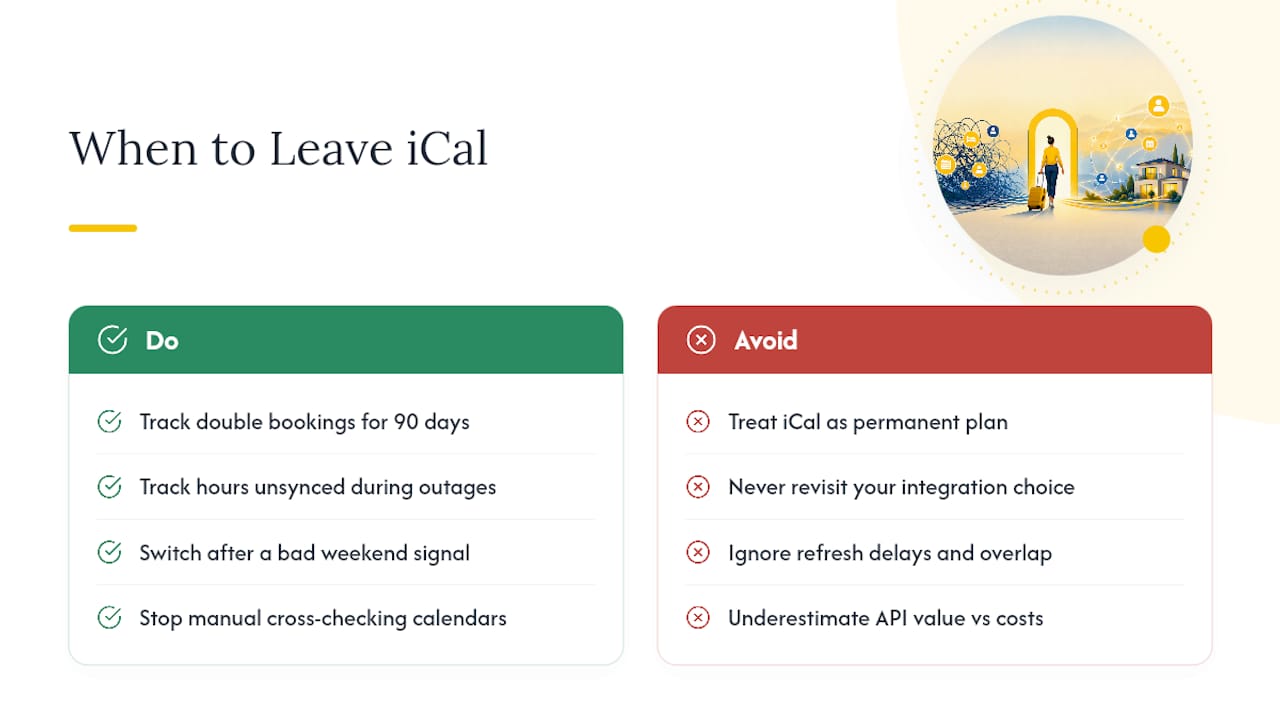
If you’re on iCal today, track two numbers for the next 90 days: how many double bookings you catch, and how many hours your calendar sat unsynced during your last two channel outages. Those numbers make the API decision for you. I’ve seen managers switch after a single bad weekend and immediately stop manually cross-checking three separate calendars every morning, which is time that goes straight back into guest communication or, frankly, sleep.
API access costs more upfront. It costs a lot less in refunds, ranking penalties, and the quiet stress of never quite trusting your own calendar.
— Sofía Herrera
Eurocheckin: Sync Your Calendars and Stay Compliant in One Platform
If iCal’s refresh delay has already cost you a double booking, or you’re just tired of checking three calendars before confirming a reservation, that’s precisely the gap Eurocheckin closes for Spanish hosts.

Eurocheckin syncs your availability automatically across Airbnb, Booking, Vrbo, and more than 12 other platforms, so a reservation on one channel blocks every other channel without a manual refresh or a copied iCal link. Alongside that sync, it automatically files each guest’s registration with SES Hospedajes, handles multilingual online check-in, and lets guests sign digital contracts and unlock smart locks from Nuki, TTLock, or Yale without you meeting them at the door.
Eurocheckin offers subscription plans and a free trial period to test the sync behavior on your listings. Start by reviewing the factors that matter when choosing check-in software, then set up your free trial directly on the Eurocheckin platform.
Sources
Airbnb’s own help documentation covers the iCal refresh and sync process directly. For deeper technical comparisons, Smoobu’s API versus iCal breakdown, Rentals United’s sync strategy guide, and Guesty’s sync method explainer each walk through the operational tradeoffs in more detail. For Spanish compliance and calendar automation specifically, see Eurocheckin’s product features.
FAQ
What Is the 80/20 Rule in Airbnb?
It typically refers to hosts getting roughly 80% of bookings from a small set of top-performing channels or listings, which is why prioritizing API access for your highest-volume channels first, rather than switching everything at once, tends to protect the bulk of your revenue during a migration.
How Much Does It Cost to Use the Airbnb API?
Airbnb doesn’t charge hosts directly for API access, but you connect through a certified channel manager or property management platform, and those tools charge their own subscription fee, usually scaled to the number of listings you manage.
How Do I Export My Airbnb Calendar to iCal?
From your Airbnb listing calendar, generate the iCal export link and copy it, then paste that URL into the import field of the receiving calendar or platform, keeping in mind the feed updates on a delayed schedule rather than instantly.
Can I Sync My Airbnb Host Calendar With Google Calendar?
Yes, Google Calendar accepts Airbnb’s iCal export link as a subscribed calendar, though it inherits the same refresh delay as any other iCal connection, so it isn’t a real-time solution for managing overbooking risk.


