



The fastest way to stop an overbooking in progress is to identify whether the affected channel connects through iCal or through an API, then treat one system as the single source of truth. In the next ten minutes: suspend instant-book on the at-risk listing, or run a manual calendar import and manually block the disputed dates while you note the exact timestamp. Polling-based sync leaves a lag window where two guests can book the same night, so speed matters more than elegance right now.
TL;DR:
- Using API connections for major channels significantly reduces sync delays and minimizes silent data collisions caused by outdated or duplicate iCal feeds.
- Checking and matching feed URLs precisely, verifying time zone consistency, and monitoring platform-specific limits are essential preventive steps against recurring calendar errors.
- Disabling instant-book during high-demand periods and shortening refresh cycles can help mitigate double bookings caused by polling gaps in iCal-only setups.
- Automating synchronization through platforms like Eurocheckin lowers manual error risk, offers instant conflict alerts, and streamlines overall channel management.
- Upgrading to API from iCal is critical for growing or high-turnover listings, especially when rapid sales, multiple channels, or staff capacity make manual fixes unfeasible.
Table of Contents
- Fast Checklist: What To Check In Under 20 Minutes
- Fixing Sync Problems By Setup Type
- How Do You Prevent Calendar Sync Problems From Recurring?
- Can An Automation Platform Reduce Sync Risk?
- When Should You Upgrade From iCal To API?
- Stop Managing Calendars By Hand, Property By Property
- Where To Go Next For Verification
- Sources
- FAQ
Fast Checklist: What To Check In Under 20 Minutes
Before you touch settings or call support, run this triage. Most sync failures trace back to one of five causes, and you can rule most of them out quickly.
- Confirm the connection type. For each OTA, check whether the listing uses an iCal (.ics) feed or a native API/partner integration. This single fact changes everything about how you troubleshoot.
- Match the .ics URLs exactly. A single stray character, an expired token, or a duplicate export can silently break an import. Compare the feed URL in your property management system (PMS) against the one listed on the OTA side, character for character.
- Check time zones on all three layers. Your PMS, each OTA listing, and the device you use to manage bookings can each carry a different time zone setting. A mismatch here shifts check-in and check-out dates just enough to create phantom availability.
- Look for channel-specific limits. Booking.com restricts iCal eligibility for larger properties and Vrbo caps how many imported calendars a single listing can carry. If you have hit a limit, the platform may silently stop honoring new imports.
- Force a manual refresh and log the time. Most OTAs offer a manual “import now” button. Use it, then write down the timestamp. That number becomes your baseline for measuring how long the next fix actually takes to propagate.
Pro Tip: Keep a simple spreadsheet with one row per listing and columns for connection type, last manual import time, and known feed URL. When something breaks at 11 p.m., you will not be hunting for this information from memory.
Fixing Sync Problems By Setup Type
How you troubleshoot calendar sync problems depends entirely on your architecture. Trace through the path that matches your setup.
If you run iCal-only connections:
- Find each OTA’s last successful import time in its calendar settings. Airbnb polls on the order of every few hours, Vrbo roughly every half hour, and Booking.com approximately every couple of hours, according to WPRentals’ breakdown of OTA polling behavior. That gap is your exposure window for a double booking.
- Where your PMS lets you shorten the refresh cycle, do it, though most platforms cap this regardless of your preference.
- During high-demand periods, disable instant-book on listings with the longest polling gap and add manual date blocks as a temporary buffer.
If you run a mix of iCal and API on the same listing:
- Search your integration settings for a legacy iCal link that predates your API activation. This is the single most common cause of what practitioners call data collision, where a stale iCal import reopens dates the API had already closed. inmoShare’s integration guide flags this as the failure mode that catches the most operators off guard.
- Pull your sync logs and look specifically for “overwrite” events on dates you know were already blocked. That is the fingerprint of a leftover iCal feed fighting your API connection.
- Delete the legacy iCal link entirely. Keep a short overlap window of a few hours after cutover and watch the logs closely rather than walking away.
If you run native API connections:
- Verify your API tokens have not expired and that webhooks are still registered on the OTA partner dashboard.
- Review push and webhook logs for failed delivery attempts rather than assuming silence means success.
- Reauthenticate the connection if you find an expired token. Most platforms make this a one-click fix once you locate it.
Once you have applied a fix, confirm it worked with a real test: create a small test booking, then watch your PMS logs and the OTA’s import timestamp to see how fast the change actually propagates, a workflow Areca’s channel manager guide recommends as the most reliable way to close the loop. Cancel the test reservation once you have confirmed the timing.
If none of this resolves the issue, contact OTA support with specifics: the exact timestamp of the failed sync, the affected booking IDs, and a screenshot of your feed settings. Vague reports (“my calendar isn’t syncing”) get generic responses. Precise ones get escalated.
How Do You Prevent Calendar Sync Problems From Recurring?
Fixing today’s overbooking matters less than making sure you are not back here in three weeks. A few structural changes cut recurrence risk substantially.
- Prioritize API over iCal for your major channels. API connections push updates in near real time and carry richer data, including rates and restrictions, not just blocked dates. Treat your PMS or channel manager as the single source of truth and let every OTA read from it.
- Delete legacy iCal feeds the moment API goes live. This is the step experienced operators repeat most often, because a forgotten iCal link is the most common cause of silent data collisions long after everything appears to be working.
- Standardize time zones across every channel and your PMS. Set them once, document the setting, and check it any time you add a new listing or channel.
- Automate owner blocks and maintenance windows so a manual calendar edit outside your PMS never becomes the thing that reopens a sold-out night.
- Limit active OTAs on single-unit listings. Fewer connected channels means fewer polling cycles running simultaneously, which lowers the statistical odds of two systems colliding on the same date.
- Set up sync failure alerts and a short written incident checklist, then audit every live connection quarterly rather than only after something breaks.
Pro Tip: Reserve iCal only for channels that genuinely have no API option. Guidance from Rentals United frames this as an API-first strategy with iCal as a controlled, clearly labeled fallback, not a default.
Can An Automation Platform Reduce Sync Risk?
A platform built around a single calendar engine removes most of the manual steps where sync errors creep in. Eurocheckin synchronizes availability automatically across Airbnb, Booking, and more than 12 other platforms, sending instant notifications the moment a reservation lands so you catch a conflict before a guest does, not after.
- Unified sync across 12+ platforms replaces the patchwork of separate iCal feeds that cause most collisions.
- Automatic reporting to SES Hospedajes keeps guest registration compliant with Real Decreto 933/2021 and GDPR without manual data entry.
- Digital contracts, e-signatures, and smart lock integration with TTLock, Nuki, and Yale mean a sync-related date change does not cascade into a check-in headache.
- Built-in service upsells and expense tracking via invoice OCR reduce the administrative load that distracts teams from catching sync issues early.
You can explore the platform’s core capabilities directly on Eurocheckin’s site.
When Should You Upgrade From iCal To API?
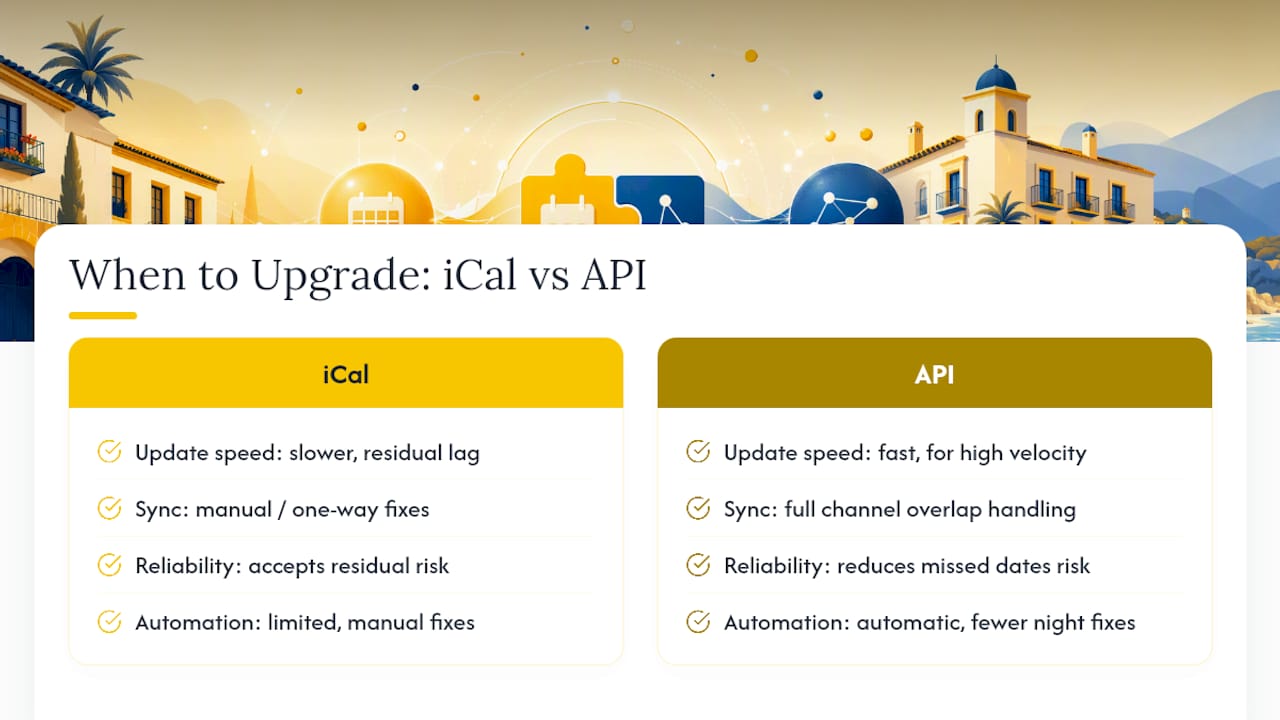
Small, low-turnover listings can run on iCal for a while and accept the residual risk, but only during low season. Once you are managing a growing portfolio, or a high-turnover urban listing where nights sell out fast, treat API as close to mandatory rather than optional.
Weigh four things before deciding: booking velocity (how fast nights actually sell), how many channels overlap on the same units, the revenue at stake per missed date, and whether your staff has the bandwidth to catch manual fixes at 11 p.m. If any one of those points toward “high,” the case for API resolves itself.
— Sofía Herrera
Stop Managing Calendars By Hand, Property By Property
Eurocheckin gives you one calendar engine instead of a dozen separate iCal feeds to babysit, which is the single biggest reason sync errors happen in the first place. It syncs availability automatically across Airbnb, Booking, Vrbo, and more than 12 other platforms while also handling your SES Hospedajes reporting and guest registry in the background.

Eurocheckin offers subscription plans based on the number of properties managed, with a free trial period to test the service before committing. If double bookings have cost you a cancellation fee or an awkward guest call this year, that is the moment to check whether Eurocheckin fits your setup and start the trial today.
Where To Go Next For Verification
- WPRentals’ iCal sync breakdown for Airbnb, Booking, and Vrbo polling intervals.
- Smoobu’s API vs. iCal explainer for the technical difference between polling and push.
- Eurocheckin’s SES Hospedajes connection guide for compliance-related sync setup.
Sources
- WPRentals – WPRentals iCal sync: Airbnb, Booking, Vrbo
- inmoShare guide — how to integrate your channel manager
FAQ
Why Is My Airbnb Calendar Not Syncing With Other Platforms?
The most common cause is a stale or duplicate iCal feed, a mismatched time zone, or a legacy iCal link left active after switching to an API connection. Check for all three before assuming the platform itself is broken.
How Often Do OTAs Actually Refresh Calendar Data?
Airbnb polls on the order of every few hours, Vrbo roughly every half hour, and Booking.com approximately every couple of hours, according to WPRentals’ documentation of OTA polling behavior. None of these are real time, which is why a manual block is your fastest safety net during an active conflict.
What Causes A Calendar Sync Error After Switching To API?
A leftover iCal feed running alongside a new API connection is the leading cause. The periodic iCal import can overwrite dates the API already closed, reopening availability that should stay blocked.
How Do I Verify That A Sync Fix Actually Worked?
Create a small test booking, then compare the OTA’s import timestamp against your PMS logs to see how fast the change propagated, before canceling the test reservation. This confirms the fix rather than assuming it based on the settings screen alone.
Does Eurocheckin Replace The Need For Manual Calendar Checks?
Eurocheckin automates calendar sync across 12+ platforms and sends instant notifications on new reservations, which removes most of the manual iCal juggling that causes sync errors in the first place, though periodic audits of your connections remain good practice regardless of platform.


