



No, iCal and ICS are not the same thing. iCalendar is the technical standard, .ics is the file built on that standard, and iCal, now called Apple Calendar, is the app that reads and creates those files. In everyday conversation, “ICS file” is almost always what people mean when they say “iCal file.”
TL;DR:
- An .ics file contains static calendar data based on the iCalendar standard, which allows compatibility across different calendar platforms and apps.
- Subscribing to a webcal:// link keeps your calendar synced with real-time updates, unlike static .ics files that must be re-downloaded after changes.
- Properly using the terms iCalendar, .ics, and Apple Calendar helps prevent support issues caused by confusing the format, the file, and the app.
- Most calendar failures stem from time zone misconfigurations, complex recurrence rules, or unencoded special characters within calendar files.
- Sending a static .ics file suits single events, but for ongoing schedules requiring updates, a webcal:// subscription offers a more reliable, live connection.
Table of Contents
- iCal vs ICS: A Quick Reference Guide
- Why the iCalendar Standard (RFC 5545) Actually Matters
- What’s Actually Inside an .ics File
- Apple Calendar vs iCalendar: Untangling the Name Confusion
- Subscribing vs Downloading: What webcal:// Actually Does
- How to Open, Import, or Subscribe to an ICS File
- Common Pitfalls That Break Calendar Compatibility
- Choosing Between a File and a Feed
- What Confuses People Most About These Terms
- Where This Article’s Facts Come From
- Sources
- FAQ
iCal vs ICS: A Quick Reference Guide
Here’s the fastest way to keep these terms straight, because mixing them up is the single biggest source of calendar confusion:
- iCalendar: the data format standard, formally defined in RFC 5545, that tells software how to structure calendar and scheduling information.
- .ics: the file extension you actually see, attached to an email invite or downloaded from a booking site, that stores data in the iCalendar format.
- iCal / Apple Calendar: Apple’s calendar app, which reads, writes, and subscribes to iCalendar data.
- webcal://: a URL scheme that tells your device “this is a live calendar subscription,” not a one-time download.
- text/calendar: the MIME type that email clients and browsers use to recognize an .ics file and hand it off to your calendar app.
You’ll run into these in different places. An .ics file shows up as an email attachment when someone invites you to a meeting. A webcal:// link shows up on a company’s “subscribe to our events” page. The word “iCal” shows up in casual speech, usually when someone means either the app or the file, which is exactly the ambiguity this guide clears up.
Why the iCalendar Standard (RFC 5545) Actually Matters
RFC 5545 is the formal specification that makes calendar apps from different companies talk to each other without falling apart. Published by the IETF, it defines how to represent events, to-dos, and free/busy time in a single interoperable format, and it replaced the older RFC 2445. Without this shared grammar, an event created in one app could easily turn into garbled text in another.
The spec also registers the text/calendar MIME type, which is why your email client knows to offer an “Add to Calendar” button instead of just showing you a wall of text. IANA’s registration recommends UTF-8 encoding, which matters if your events include accented characters, non-Latin scripts, or emoji in the event title.
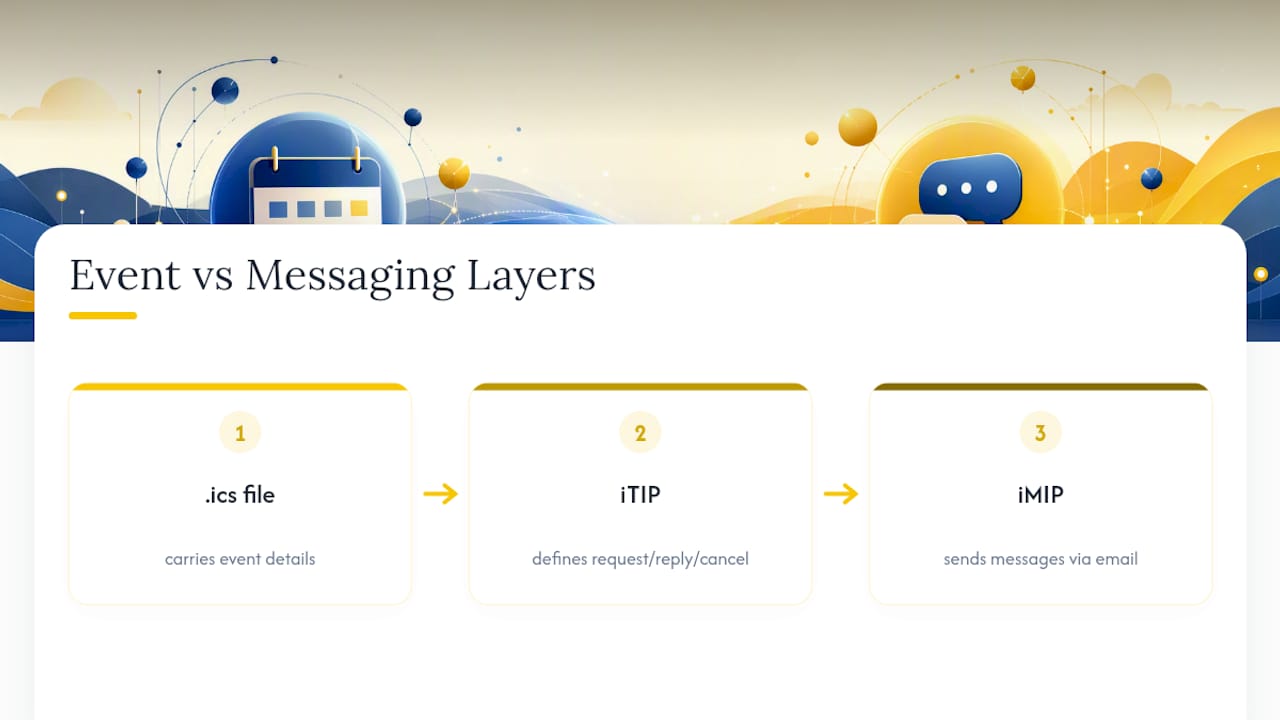
Here’s what a plain .ics file usually can’t do on its own: track whether someone accepted or declined your invite. That functionality comes from two related protocols. iTIP (iCalendar Transport-Independent Interoperability Protocol) defines how scheduling messages like “request,” “reply,” and “cancel” flow between calendars. iMIP (iCalendar Message-Based Interoperability Protocol) defines how those iTIP messages travel over email specifically. A static .ics attachment gives you the event details; iTIP and iMIP are what let your “Yes, I’ll attend” click actually update the organizer’s calendar automatically, as explained in IONOS’s breakdown of iCalendar.
That distinction explains a common complaint: “I opened the .ics file but my RSVP never got back to the sender.” The file did its job. It just wasn’t paired with the messaging layer that closes the loop.
What’s Actually Inside an .ics File
Open an .ics file in any plain text editor and you’ll see it’s just structured text, not a proprietary binary format. Everything sits inside a VCALENDAR wrapper, and each individual meeting or appointment lives inside its own VEVENT block. The RFC 5545 specification lays out exactly which lines are required and which are optional.
The properties you’ll see most often:
- UID: a unique identifier for the event, so calendar apps don’t create duplicates when the same file gets re-imported.
- DTSTART / DTEND: the start and end timestamps, often paired with a timezone identifier (TZID).
- SUMMARY: the event title.
- LOCATION: where it happens, physical address or meeting link.
- RRULE: the recurrence rule, if the event repeats weekly, monthly, or on some custom pattern.
- ORGANIZER and ATTENDEE: who created the event and who’s invited.
One practical note worth knowing: renaming a file from .ics to .txt doesn’t change a single byte inside it. Since the format is plain text by design, you can open it in Notepad, TextEdit, or any code editor to troubleshoot a broken import without needing special software.
Apple Calendar vs iCalendar: Untangling the Name Confusion
Apple’s calendar app was literally named “iCal” from 2002 until 2012, when Apple renamed it “Calendar” as part of the iOS-to-Mac naming alignment. Old habits stick, though, and plenty of longtime Mac users still call the app “iCal” more than a decade later, which is exactly why it gets confused with the iCalendar format itself.
Functionally, Apple Calendar is one implementation of the iCalendar standard among many. It imports .ics files you download or receive by email, and it subscribes to webcal:// feeds for calendars that update automatically, like a shared team schedule or a public holiday calendar.
If you want to talk about this clearly, and avoid confusing coworkers, clients, or support tickets, use three separate terms: “Apple Calendar” for the app, “iCalendar” for the underlying format, and “.ics” for the actual file. It sounds like a small distinction, but it’s the difference between someone troubleshooting the right thing and wasting twenty minutes chasing the wrong problem.
Subscribing vs Downloading: What webcal:// Actually Does
The webcal:// scheme isn’t a separate transport protocol. It’s a signal. When your device sees a webcal:// link, it tells the operating system “hand this off to the calendar subscription handler,” which then quietly fetches the file over standard http or https behind the scenes, per IANA’s provisional URI scheme registry.
The practical difference between subscribing and downloading is significant:
- Subscribing (webcal://) links your calendar to a live feed. When the source updates an event, your calendar reflects that change automatically on its next refresh.
- Downloading (.ics) creates a static snapshot. If the organizer changes the meeting time after you import it, your copy stays frozen until someone sends you a new file.
Pro Tip: If you’re publishing a calendar that changes often, like office hours, staff shifts, or property availability, always offer a webcal:// subscription link instead of a downloadable .ics. A one-time file guarantees your audience is working from outdated information within days.
This is exactly the logic behind live calendar synchronization for vacation rentals, where availability changes constantly across multiple booking platforms and a static file would create overbooking risk almost immediately.
How to Open, Import, or Subscribe to an ICS File
The steps differ slightly by platform, but the logic is the same everywhere: distinguish between a one-time import and an ongoing subscription.
- Apple Calendar: Double-click the .ics file to import it as a one-time event, or go to File > New Calendar Subscription and paste a webcal:// or https link for a live feed.
- Google Calendar: Click the gear icon, choose Settings > Import & Export to upload a downloaded .ics file, or use “Other calendars > Add by URL” to subscribe to a feed.
- Outlook: Use File > Open & Export > Import/Export for a static .ics file, or Add Calendar > From Internet for a subscription link.
Three issues cause most support headaches. Timezone mismatches happen when an .ics file lacks a proper TZID and the receiving app guesses wrong, shifting every event by hours. Duplicate events appear when the same file gets imported twice without a consistent UID. And email security filters sometimes strip or quarantine .ics attachments, especially from unfamiliar senders, since text/calendar attachments have historically been used to deliver spam invites.
Subscription feeds also lag behind reality more than people expect, since calendar apps typically refresh a webcal:// feed on their own schedule rather than instantly. If you need guaranteed tracked RSVPs for something like a large conference, a plain .ics file won’t cut it; you need a system built on iTIP and iMIP that actually records responses.
Common Pitfalls That Break Calendar Compatibility
Most cross-platform calendar failures trace back to a handful of repeat offenders:
- Missing or incorrect TZID values cause events to display at the wrong local time when opened on a device in a different timezone.
- Overly complex RRULE patterns, like “every second Tuesday except holidays,” sometimes get partially dropped by apps with limited recurrence support.
- Confusing http with webcal:// causes browsers to download a static file when the sender actually intended a live subscription.
- Cached feeds mean a subscribed calendar may not reflect an update for several hours, depending on the app’s refresh interval.
- Unencoded special characters in event titles or descriptions can corrupt the file if it wasn’t saved in UTF-8, as IANA’s media type guidance recommends.
On the privacy side, .ics attachments sent from unfamiliar addresses are a known spam vector, which is why some email providers flag them automatically. If you’re sending calendar invites at scale, sending from a verified, consistent domain reduces the odds of your invitations landing in a spam folder instead of an inbox.
Choosing Between a File and a Feed
The right delivery method depends entirely on what you’re sharing and how often it changes.
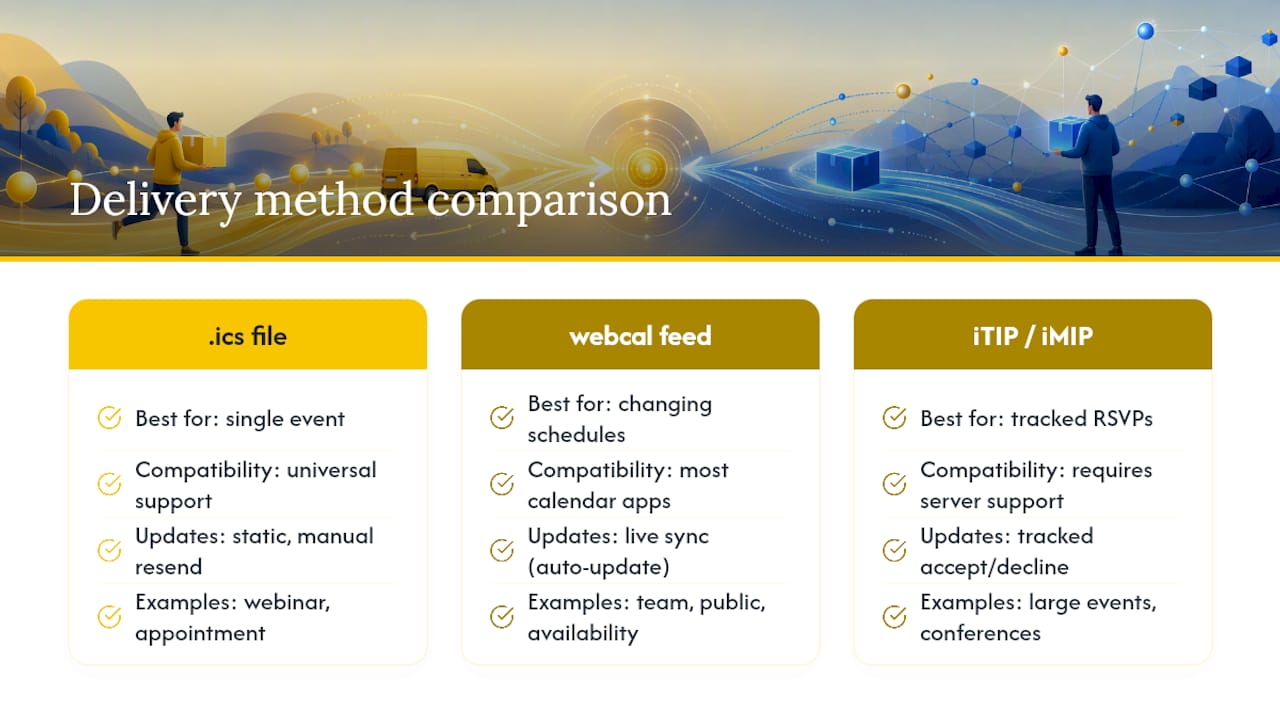
Send a downloadable .ics file when you’re inviting someone to a single event, a webinar, an appointment, a one-time meeting. It’s the most universally compatible option since virtually every calendar app on the planet can open one.
Publish a webcal:// subscription feed when the underlying schedule changes regularly and recipients need to see updates without re-downloading anything. Team schedules, public event calendars, and property availability calendars all fall into this category. This is precisely why choosing the right check-in software for a rental or hotel operation means looking closely at how well it handles live calendar sync across platforms, not just static exports.
For large-scale events where you need to know exactly who accepted, declined, or never responded, neither a bare .ics file nor a webcal feed will get you there. That requires a system built on iTIP and iMIP, or a dedicated event management platform designed for tracked invitations.
What Confuses People Most About These Terms
The confusion around iCal versus ICS isn’t really a technical problem. It’s a language problem. Apple spent a decade calling its app “iCal,” and that name stuck around in casual speech long after the rename to Calendar, which means most people learned the wrong mental model before they ever needed the right one.
I’d argue the fix isn’t complicated, but it does require discipline, especially from anyone writing documentation or answering support tickets. Say “iCalendar” when you mean the standard, “.ics file” when you mean the thing someone downloaded or received, and “Apple Calendar” when you mean the app. Support teams that enforce this distinction internally tend to resolve calendar tickets faster, simply because the person on the other end isn’t trying to troubleshoot a webcal feed while thinking it’s a downloaded file. Precision in vocabulary, in this specific case, translates directly into fewer back-and-forth emails.
— Sofía Herrera
Where This Article’s Facts Come From
The technical claims here trace back to primary standards, not secondhand summaries. RFC 5545 defines the iCalendar grammar itself. The Library of Congress documents its role in long-term format preservation. IANA’s media type registry confirms the text/calendar MIME type and file extensions. IONOS offers a practical, user-facing explanation of how iTIP and iMIP extend a static .ics file into something interactive.
Sources
- RFC 5545 - Internet Calendaring and Scheduling Core Object Specification (iCalendar)
- iCalendar — Library of Congress digital preservation
- What is iCalendar and how do you create an ICS file? - IONOS
FAQ
Are ICS and iCal the same thing?
No. ICS refers to the file format built on the iCalendar standard, while iCal was Apple’s original name for its calendar app, now called Apple Calendar.
Is iCal still a thing?
The app itself is still very much active, just renamed to Apple Calendar since 2012, though many longtime users still call it iCal out of habit.
Is ICS an Apple Calendar file?
No, .ics is a universal file format defined by RFC 5545, and it works across Apple Calendar, Google Calendar, Outlook, and virtually every other major calendar app.
What does iCal stand for?
“iCal” doesn’t stand for anything as an acronym. It was simply Apple’s product name for its calendar application, following the company’s “i” branding convention used for iMac, iPod, and iPhone.


