


A booking confirmation email must give the guest instant proof of the reservation and one clear next step: reservation ID, guest name, dates, property or address, and how payment or access will work. Send it within minutes of booking. Use email as the permanent record and SMS for anything time-sensitive, like access codes. A solid template plus automation removes manual work and cuts last-minute cancellations caused by confusion.
TL;DR:
- Sending confirmation emails within minutes of booking ensures guests have instant proof and reduces support inquiries about reservation details.
- Key information such as reservation ID, guest contact, stay details, payment summary, and access instructions must be clearly structured and scannable.
- Automating confirmation delivery with integrated property management systems prevents duplicates, enhances reliability, and streamlines guest communication.
- Crafting specific, action-oriented subject lines and personalized opening lines boosts open rates and validates the confirmation’s authenticity.
- Verifying deliverability through monitored sender addresses, correct link functioning, and mobile optimization minimizes undelivered or overlooked confirmations.
Table of Contents
- Booking Confirmation Email Checklist: What Every Message Needs
- What Makes a Good Subject Line for a Confirmation Email?
- When Should You Send a Reservation Confirmation Message?
- Booking Confirmation Email Templates You Can Copy Today
- How Do You Automate Booking Confirmations Reliably?
- Deliverability Checklist: Making Sure Guests Actually Get It
- Common Booking Confirmation Mistakes to Avoid
- How We Think About Confirmations at Eurocheckin
- Automate Confirmations Without Losing the Compliance Step
- Sources
- FAQ
Booking Confirmation Email Checklist: What Every Message Needs
Skip any of these and you’ll field a support call within 24 hours. A guest who can’t find their confirmation number or doesn’t know when check-in instructions arrive will email you, or worse, leave a public review asking where their booking details went.
Checkfront’s guide to booking confirmations lists guest name, dates, booking details, and location as non-negotiable core fields. Global Vacation Rentals adds a practical reason: both guest and operator need searchable identifiers to verify the booking weeks later, when memory of the original email has faded.
Here’s the full list to build into your template or booking confirmation message workflow:
- Reservation ID and booking source. A unique confirmation number, plus whether the booking came through Airbnb, Booking.com, Vrbo, or direct.
- Guest identity and contact details. Full name, email, and phone number, especially for group bookings where a lead guest manages the party.
- Stay details and occupancy. Check-in and check-out dates, number of nights, number of guests, and any room or unit designation.
- Payment summary. Total amount, amount paid, balance due, and whether this message doubles as a receipt or is strictly a confirmation (state this explicitly, since guests often conflate the two).
- Policy summary with a link. A one-line cancellation policy summary plus a link to full terms, not a wall of legal text in the body.
- Arrival logistics. Check-in window, and if access details (door codes, key lockbox, digital key) come separately, say exactly when.
- Support contact and escalation path. A monitored phone number or chat channel, not a dead-end inbox.
- Light upsell and house rules link. One optional add-on offer and a link to house rules, kept brief so it doesn’t bury the essentials.
Hostrexa’s guide to direct booking messages makes a point worth repeating: keep the confirmation scannable. A guest checking their phone on a train platform should find their check-in date in under five seconds. That means bullet points and bold text, not paragraphs.
Pro Tip: Separate “confirmation” from “receipt” in your subject line and body copy. Guests who booked with a deposit often assume the confirmation email means they’ve paid in full, which can trigger disputes at checkout when payment expectations are unclear.
What Makes a Good Subject Line for a Confirmation Email?
The best subject lines tell the guest exactly what happened and when, with zero ambiguity. Mailchimp’s guidance on booking confirmations recommends concise, specific subject lines over generic ones like “Thank you for your booking,” which get lost in a crowded inbox.
Three formulas work consistently across property types:
- Confirmation + dates: “Your Stay at [Property] Is Confirmed: March 12–15”
- Confirmation + reservation ID: “Booking Confirmed #48213: See You March 12”
- Action-oriented: “You’re All Set for [Property]: Check-In Details Inside”
Six ready examples: “Confirmed: 3 Nights at Casa Del Mar,” “Your Reservation #48213 Is Booked,” “You’re Confirmed for March 12 to 15,” “Booking Complete: Next Steps Inside,” “See You Soon: Confirmation for [Guest Name],” and “Your Stay Is Locked In: Details Attached.”
Opening lines matter almost as much. A personalized opener (“Hi Marcus, your stay at Casa Del Mar is confirmed”) outperforms a generic one (“Your booking has been received”) because it signals a human, not a bot, sent the message. Where personalization isn’t feasible, “Great news, your reservation is confirmed” still beats a flat transactional tone.
On mobile, the preheader text (the snippet visible next to the subject line) should reinforce the dates or confirmation number, since roughly half of hospitality emails get opened on a phone first. Keep your brand name or logo visible above the fold, not buried under three paragraphs of legal disclaimer.
Pro Tip: If you’re setting up a new automated workflow, A/B test two subject lines against a small batch of bookings before rolling out to everyone. A confirmation-focused line and a warmer, welcome-focused line often perform differently depending on your guest demographic.
When Should You Send a Reservation Confirmation Message?
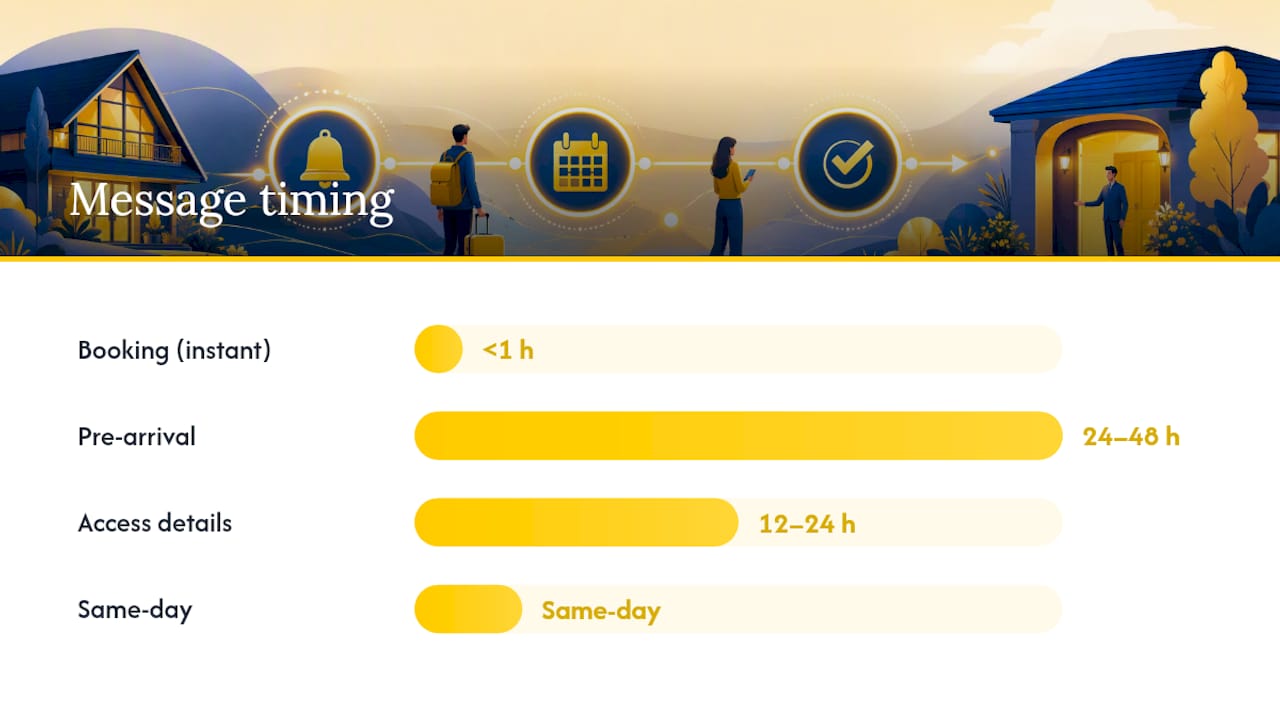
Send the initial confirmation within minutes of booking, not hours. USTechAutomations’ property management guide recommends a three-touch cadence: instant confirmation, a reminder 24 to 48 hours before arrival, and a same-day nudge with final access details.
Email works best as the permanent record, the one the guest can search for later. SMS and WhatsApp fit time-sensitive nudges: a same-day reminder, a lockbox code, or a “your host is 10 minutes away” alert. If the reservation came through an OTA, mirror key details into that platform’s own message thread too, since some guests never check the email they used to book.
Delay access codes until closer to arrival on security grounds, but don’t wait so long that a guest lands at your door with no code and no signal. A reasonable rule of thumb: send full access instructions 12 to 24 hours before check-in, unless your lock system generates a fresh, single-use code per reservation, in which case same-day delivery is safer.
| Touchpoint | Timing | Best channel | Purpose |
|---|---|---|---|
| Booking confirmation | Instant (within minutes) | Permanent record, reservation details | |
| Pre-arrival reminder | 24–48 hours before check-in | Email + SMS | Confirm dates, surface policies |
| Access details | 12–24 hours before check-in (or same-day for single-use codes) | SMS | Time-sensitive, urgent |
| Same-day nudge | Morning of arrival | SMS | Reduce no-shows, final logistics |
Log every touchpoint back to the booking record and keep your calendar synced across platforms. A missed sync is how double-bookings happen, and no cadence fixes that after the fact.
Booking Confirmation Email Templates You Can Copy Today
These four templates cover the bookings you’ll handle most often. Adapt the bracketed fields to your property management system or email tool.
-
Standard confirmation. Subject: “Your Stay at [Property] Is Confirmed.” Body: “Hi [Guest Name], your reservation is confirmed. Reservation #[ID] Check-in: [Date] Check-out: [Date] Address: [Property Address] Total: $[Amount] ([Paid/Balance Due]) Questions? Reply here or call [Phone].” This format gives the guest a scannable block instead of a narrative paragraph, which matters most on mobile.
-
Self-check-in confirmation. Subject: “You’re Confirmed: Self-Check-In Instructions Coming Soon.” Body: “Hi [Guest Name], your stay at [Property] is booked for [Dates]. Since this is a self-check-in property, we’ll send your digital key and door code by [time, e.g. 3 PM the day of arrival]. Reservation #[ID]. Need help before then? Contact us at [phone/email].” Stating exactly when the code arrives prevents the “where’s my code” message you’d otherwise get an hour before check-in.
-
Group booking confirmation. Subject: “Group Reservation Confirmed: [Property], [Dates].” Body: “Hi [Lead Guest Name], your group booking for [number] guests is confirmed. Reservation #[ID]. Deposit paid: $[Amount]. Balance due: $[Amount], due [date]. Rooms/units assigned: [list]. Full payment and cancellation terms: [link].” Group bookings need the payment split visible up front, since disputes here usually trace back to unclear deposit terms.
-
SMS reminder and same-day nudge. Reminder (24 to 48 hours out): “Hi [Guest Name], just a reminder your stay at [Property] starts [Date]. Check-in details land tomorrow.” Same-day: “Your check-in code for [Property] is [Code]. Address: [Address]. Text us anytime at [Phone] if you need help.” Short, direct, no fluff, because a guest reading this while parking outside your property doesn’t need paragraphs.
Xola’s collection of confirmation email examples reinforces a pattern worth copying: tailoring the template to the booking type (standard, self-check-in, group) cuts pre-arrival questions because the guest knows exactly what happens next, without having to ask.
How Do You Automate Booking Confirmations Reliably?
Reliable automation depends on a clean integration chain: your booking engine or property management system feeds a calendar and channel manager, which feeds a transactional email and SMS provider. Break any link in that chain and confirmations either duplicate or vanish.
Configure three triggers at minimum:
- Confirmed booking trigger that fires the instant confirmation the moment payment or reservation status changes to confirmed.
- Payment receipt trigger that fires separately from the confirmation, so guests never confuse the two.
- Pre-arrival access trigger timed to your security rule of thumb, whether that’s 24 hours out or same-day.
Prioritize calendar writeback across every channel you sell on, multilingual templates if you host international guests, and outcome logging so you can see which confirmations bounced or went unopened. A digital traveler registry that automates both guest reporting and calendar sync removes a manual step that otherwise sits between booking and check-in, particularly where regulatory reporting is required alongside the guest-facing message.
Deliverability Checklist: Making Sure Guests Actually Get It
A confirmation that lands in spam is worse than no confirmation, since it creates false confidence that the guest was reached. Run these checks before any bulk rollout:
- Use a monitored sender address, never a no-reply. Industry guidance consistently points to a monitored contact channel as the difference between a guest replying with a quick question and a guest escalating straight to a review or chargeback.
- Verify DKIM and SPF records on your sending domain before launch, and test rendering across Gmail, Outlook, and Apple Mail on both desktop and mobile.
- Run a spam-score check on your template with a tool like Mail Tester before turning on automation for all bookings.
- Monitor bounce rate and open rate weekly, and set an SMS fallback for any confirmation that shows as undelivered after a set window.
- Validate every link and map pin in the template, since a broken address link sends guests to the wrong building.
- Keep the subject line and preheader tight. SmartOrder’s hotel confirmation guide flags vague subject lines and unoptimized mobile layouts as the two most common deliverability failures in hospitality email.
Roughly half of all hospitality email opens happen on a phone, which means a template that looks fine on a widescreen monitor but breaks on a 6-inch screen is failing most of your guests before they even read it.
Common Booking Confirmation Mistakes to Avoid
Most failed confirmations trace back to a handful of repeat offenders: missing confirmation numbers, cancellation policies buried in fine print, calendars that haven’t synced across platforms, and access codes sent days too early. Watch your open rates and guest feedback for red flags, since a spike in “where’s my confirmation” messages usually means a deliverability or template problem, not a guest error.
Run this seven-item check before you send or automate:
- Confirmation number is visible in the first three lines
- Dates and property address are correct and match the booking system
- Payment status (paid, deposit, balance due) is unambiguous
- Cancellation policy link works and isn’t just a paragraph of text
- Access details are scheduled, not sent immediately unless security allows it
- Sender address is monitored, not no-reply
- Template renders correctly on mobile before broad rollout
How We Think About Confirmations at Eurocheckin
A booking confirmation email isn’t just a courtesy message. It’s the first piece of a compliance and guest experience chain that continues through check-in, and in Spain, through mandatory traveler reporting. Treating it as an afterthought is how properties end up fielding avoidable support calls and, in some cases, falling behind on regulatory recordkeeping.
Eurocheckin’s approach ties the confirmation moment to an automated traveler registry, multilingual check-in links, and calendar sync across more than a dozen platforms, so the same trigger that confirms a stay can also queue the compliance step. Smart-lock integrations with Nuki, TTLock, and Yale extend that logic through to self-check-in, which is where most manual confirmation workflows quietly break down.
— Sofía Herrera
Automate Confirmations Without Losing the Compliance Step
Most property managers juggle two separate systems: one for guest-facing confirmations and templates, another for the traveler reporting Spanish law requires under Real Decreto 933/2021. Eurocheckin merges both into a single trigger, so the same booking event that sends your confirmation email also files guest data to SES Hospedajes automatically, with no duplicate data entry.

Beyond the reporting piece, Eurocheckin adds multilingual check-in links for Airbnb, Booking, and Vrbo reservations, calendar sync across more than 12 platforms to prevent the double-bookings that wreck a confirmation workflow, and smart-lock integration with Nuki, TTLock, and Yale for guests who never need a code sent manually at all. Hosts can also attach paid upsells guests settle instantly with Apple Pay or Google Pay, turning the confirmation sequence into a small revenue channel rather than pure overhead.
If your current setup means copying guest data between your booking calendar, your email tool, and a government portal, see how Eurocheckin automates traveler registration and start a free trial to test it against your next batch of reservations.
Sources
- Booking Confirmation Email Tips and Tricks — Mailchimp
- How to Write a Booking Confirmation Email — Checkfront
- 10 Great Booking Confirmation Emails — Xola
- Property Management Booking Confirmations: Save 40% in 2026 — USTechAutomations
- How to write a confirmation email for a hotel booking — SmartOrder
FAQ
What Is a Booking Confirmation Email?
It’s the message a guest receives after a reservation is finalized, confirming reservation details like guest name, dates, property, and payment status, and serving as the guest’s proof of booking.
Does Booking.com Send a Confirmation Email?
Yes, Booking.com sends its own automated confirmation once a reservation is finalized, but properties should still mirror key details into their direct email or SMS system so guests have a single, searchable reference.
What Does a Booking Confirmation Email Look Like?
A well-built one is short and scannable: a confirmation number, guest name, check-in and check-out dates, property address, payment summary, and a clear line about when access instructions will arrive.
How Can I Check if My Booking Is Confirmed?
Search your inbox for the reservation ID or property name from the original confirmation message, since booking platforms often let you retrieve reservation status using that confirmation number (link). If nothing arrived within a few minutes of booking, contact the property’s monitored support line directly.


