


Copy your Vrbo export URL and paste it into your other platform’s import field. Then copy that platform’s export URL and paste it into Vrbo. That two-way exchange is a Vrbo calendar sync, and it takes about five minutes to set up.
Once both sides are connected, check both calendars the next day. Vrbo displays imported events for up to 365 days, so a booking made on Airbnb should show as blocked on your Vrbo calendar shortly after.
Here’s your quick checklist:
- Export your Vrbo calendar URL from the Owner Dashboard.
- Import that URL into Airbnb, Booking.com, or your website builder.
- Repeat in reverse: import their export URL into Vrbo.
- Confirm the block appears on both sides within a few hours.
Pro Tip: iCal is not instant. It runs on a polling schedule, so a same-day, back-to-back booking on two platforms can still slip through before either calendar catches up.
TL;DR:
- Two-way calendar syncing requires exporting and importing iCal URLs on each platform, with updates typically visible within a few hours due to polling delays.
- Vrbo checks external feeds roughly every 30 minutes, while Airbnb and Booking.com poll every up to 3 hours, creating a window for double bookings.
- Cancelled bookings may not always update correctly if the feed drops cancellation flags or rotates IDs, so multiple misses over hours are needed to confirm cancellations.
- Relying solely on iCal for multiple properties or high booking volumes increases double-booking risk, so automation tools with real-time sync are recommended for scale.
- Regularly verifying that calendar URLs load properly and observing recent bookings ensures feed health and minimizes sync failures.
Table of Contents
- How Vrbo Calendar Sync Actually Works Behind the Scenes
- How Do You Export and Import a Vrbo Calendar?
- Why Isn’t My Sync Working, and How Do I Fix It?
- What’s the Best Way to Prevent Double Bookings?
- How Eurocheckin Handles Calendar Sync and Compliance Together
- Key Takeaways
- Why the Common Advice on Calendar Sync Misses the Point
- A Simpler Way to Manage Calendars Across Every Platform
- Sources
- FAQ
How Vrbo Calendar Sync Actually Works Behind the Scenes
An iCal feed isn’t a live connection. It’s a file (a .ics file) that sits at a URL, and each platform checks that URL on its own schedule to see what’s changed. Nobody pushes updates to anyone. Everyone pulls.
That pull model is the root of nearly every sync complaint you’ll ever have. Vrbo checks external feeds roughly every 30 minutes, which is fast by industry standards. Airbnb polls every one to three hours, and Booking.com can take up to two hours to reflect a change made elsewhere.
| Platform | Typical polling interval |
|---|---|
| Vrbo | About 30 minutes |
| Airbnb | 1 to 3 hours |
| Booking.com | Up to 2 hours |
That gap between “booking happened” and “other calendars noticed” is your exposure window. A guest can book your Vrbo listing, and for the next hour or two, your Airbnb calendar still shows those same dates as open.
There’s a second wrinkle: cancellations don’t always announce themselves cleanly. Some iCal feeds drop the STATUS:CANCELLED flag entirely or rotate the booking’s unique ID when it changes, which means a naive sync tool might read a cancellation as a brand-new, unrelated event instead of freeing up the dates.
How Do You Export and Import a Vrbo Calendar?
Exporting and importing are two separate actions, and you’ll need to do both if you want a true two-way sync.
To export your Vrbo calendar:
- Log into your Vrbo Owner Dashboard and open Calendar.
- Go to Settings, then Availability, then Connect calendars.
- Select Export calendar and copy the generated URL.
- Decide whether to include tentative bookings. Vrbo lets you toggle this, but it explicitly warns against exporting tentative bookings to other listing sites, since a tentative hold on Vrbo can conflict with a confirmed reservation elsewhere.
To import an external calendar into Vrbo:
- From the same Connect calendars menu, choose Import calendar.
- Paste the iCal URL from Airbnb, Booking.com, or your property website.
- Save, and give it a few minutes to pull the first batch of events.
A few things worth knowing before you rely on this: Vrbo caps you at five imported calendars per property, and any imported event only displays for up to 365 days out. If you manage a property that takes bookings further ahead than that, plan to re-check the feed periodically.
On the Vrbo Owner app, the flow lives in the same Calendar tab, though the import and export options are sometimes one tap deeper than on desktop. The copy-URL mechanic is identical either way.
After setup, paste the export URL directly into a browser tab. You should see raw calendar text (the .ics format) load without an error. If it does, the feed is live and something else is causing any sync gap you’re chasing.
Why Isn’t My Sync Working, and How Do I Fix It?
Most sync failures trace back to one of four causes, and each has a fast diagnostic.
- A dead or invalid URL. Paste it into a browser. If you get a 404 or a blank page instead of calendar text, the link has expired or was never copied correctly.
- An HTTP/HTTPS mismatch. Some platforms reject a feed served over plain HTTP when they expect HTTPS. Check the URL prefix if the import silently fails.
- A rotated link. Changing your password or editing certain listing settings can regenerate your export URL, which breaks every platform still pointed at the old one.
- A missing cancellation. If a booking canceled on one platform still shows as blocked elsewhere, the feed may have dropped its cancellation flag rather than the sync being broken.
Don’t panic and delete an event the first time it disappears from a feed. A single missed fetch is common and doesn’t necessarily mean a cancellation; a more reliable approach waits for two or more consecutive misses across several hours before treating a booking as truly gone.
Pro Tip: If you hit Vrbo’s five-calendar import limit, consolidate secondary listing sites into one combined feed before importing, rather than trying to add a sixth source.
If the feed never loads at all, even after regenerating the URL, that’s a support ticket to Vrbo, not something you can fix on your end.
What’s the Best Way to Prevent Double Bookings?
Every mitigation here reduces risk. None of them eliminates it, because iCal has no real-time push mechanism.
Set up two-way syncing everywhere, not just from your busiest platform. A one-way sync (only importing into Vrbo, say) leaves every other platform blind to Vrbo bookings, which defeats the purpose entirely.
Layer in operational buffers on top of the sync itself:
- Add a buffer day between bookings where your cleaning schedule allows it.
- Align minimum-stay rules across platforms so a same-day, short-notice booking is less likely to slip through.
- Block same-day check-ins during your highest-demand weeks if your polling exposure feels too risky.
- Never export tentative or unconfirmed bookings to an OTA feed, since Vrbo’s own guidance flags this as a source of payment and reservation conflicts.
Do the math on your actual exposure. If Vrbo polls every 30 minutes and Booking.com takes up to two hours, a booking made on Vrbo could sit unblocked on Booking.com for close to two hours. For a property that books multiple times a week, that adds up to real risk over a season, even if any single window feels small.
Real-time API integrations close that gap because they push updates the instant a booking happens, rather than waiting for the next scheduled poll. That’s the fundamental limit of iCal: RFC 5545, the standard behind the format, was never built for push notifications.
If you’re managing one or two properties with moderate booking velocity, two-way iCal sync with buffer days is often good enough. If you’re running multiple properties, listing during a high-demand event, or watching your booking pace climb, a dedicated real-time sync setup removes the exposure window instead of just narrowing it.
How Eurocheckin Handles Calendar Sync and Compliance Together
Eurocheckin syncs your calendar automatically across Airbnb, Booking, and Vrbo, plus over a dozen other platforms, so you’re not manually managing five separate iCal links and hoping none of them rotate silently.
- Automatic calendar sync across 12+ platforms, cutting the manual copy-paste maintenance iCal requires.
- Automatic guest reporting to SES Hospedajes, built to match Real Decreto 933/2021 and GDPR requirements.
- A fully digital traveler registration book, stored on EU-based infrastructure.
- Unlimited multilingual online check-in, smart links for Airbnb, Booking, and Vrbo, e-signed contracts, and smart lock integration with TTLock, Nuki, and Yale.
Pro Tip: If you host in Spain, calendar sync and legal guest reporting are two separate problems most tools solve separately. Solving them in one platform means one less login to check every morning.
Property owners juggling five iCal links across three platforms are managing infrastructure, not running a rental business.
Key Takeaways
Vrbo calendar sync through iCal works for most small operators, but its polling delay means no iCal-only setup is ever fully immune to double bookings.
| Point | Details |
|---|---|
| Two-way sync is mandatory | Import and export on both platforms, or one side stays blind to the other’s bookings. |
| Know your exposure window | Vrbo polls roughly every 30 minutes, Airbnb every 1 to 3 hours, and Booking.com up to 2 hours. |
| Never export tentative bookings | Vrbo warns this can create payment or reservation conflicts with other booking sites. |
| Watch for silent cancellations | Feeds can rotate booking IDs or drop cancellation flags, so wait for repeated misses before assuming a booking canceled. |
| Consider a unified platform for scale | Eurocheckin syncs 12+ platforms automatically and adds SES Hospedajes compliance reporting in the same system. |
Official Help Pages and Practical Explainers to Consult
- Vrbo’s own import and export instructions
- PriceLabs’ walkthrough on syncing Airbnb and Vrbo calendars
- Smart Order’s comparison of iCal versus channel managers
Why the Common Advice on Calendar Sync Misses the Point
Most guides treat calendar sync as a one-time setup task. Paste the URL, done, move on. That framing is what gets hosts into trouble, because iCal degrades quietly. A feed that worked fine in January can silently break in June after a password reset regenerates the export link, and nobody notices until a guest shows up to a room that’s already occupied.
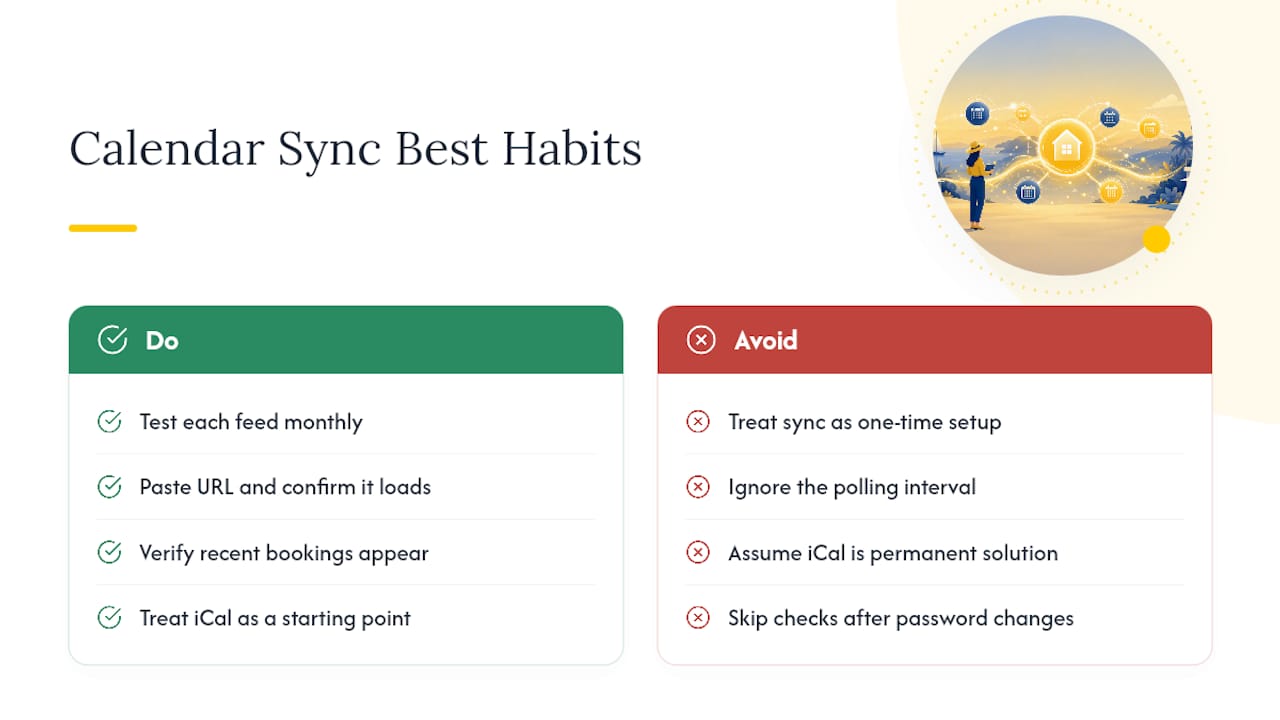
The bigger blind spot is treating polling interval as a technical footnote instead of the central fact it is. A 30-minute or two-hour gap sounds trivial until you’re running four properties during a festival weekend, when booking velocity turns that gap into the difference between a clean season and a refund conversation with an angry guest.
What I’d prioritize first isn’t buffer days or minimum-stay rules, useful as they are. It’s building a habit of testing your feeds monthly, the same way you’d check smoke detectors. Paste the URL, confirm it loads, confirm recent bookings appear. For hosts scaling past two or three properties, treating iCal as a permanent solution rather than a starting point is the real mistake, not any single misconfigured link.
— Sofía Herrera
A Simpler Way to Manage Calendars Across Every Platform
If you’ve read this far, you already know iCal sync means checking feeds, watching for rotated URLs, and accepting a polling delay as the cost of doing business across multiple platforms. Eurocheckin removes that maintenance load: it syncs Airbnb, Booking, Vrbo, and 12+ other platforms automatically, so you’re not the one diagnosing a dead feed at 11pm before a guest arrives.

For hosts in Spain, the bigger win is what comes bundled with that sync. Eurocheckin also handles automatic SES Hospedajes reporting, keeping you compliant with Real Decreto 933/2021 without a separate registration process for every guest. Add multilingual online check-in, smart lock integration, and digital contracts, and you’ve replaced a stack of disconnected tools with one dashboard. Plans start at around €5 per month per accommodation, with a free trial available. If double-booking risk and manual guest registration are both eating your week, see how automated compliance and sync work together and start your trial today.
Sources
- Import a calendar to sync with Vrbo — Vrbo Help
- iCal Sync WordPress: How It Works and Where It Breaks — WPRentals
- How Vrbo iCal cleaning sync actually works (and where it breaks) — CleanSync
FAQ
Why isn’t my Vrbo calendar syncing with Airbnb?
The most common causes are an expired or rotated export URL, an HTTP/HTTPS mismatch between the two platforms, or simply waiting less than a full polling cycle, since Airbnb can take up to three hours to check an updated feed.
How do I synchronize my calendar across platforms?
Export your calendar’s iCal URL from each platform and import it into every other platform you use, creating a two-way loop rather than a one-way import.
What’s the best way to sync Airbnb and Vrbo calendars?
Two-way iCal import works well for one or two properties with moderate booking volume; portfolios with higher velocity or multiple properties typically need a platform like Eurocheckin that syncs automatically across 12 or more sites without manual link management.
How do I force a Vrbo calendar to sync faster?
You can’t force an immediate refresh since iCal runs on a fixed polling schedule, but removing and re-adding the calendar connection sometimes triggers an early fetch, and testing the URL directly in a browser confirms whether the feed itself is the problem.
Is iCal syncing enough, or do I need a channel manager?
iCal sync works for low-to-moderate booking volume, but its polling delay means it can’t fully guarantee real-time protection, so operators managing several properties or high-demand periods usually benefit from a real-time integrated system instead.


